PFC Frames and ECN Packets Monitoring
Overview
OcNOS supports Priority-based Flow Control (PFC) to pause frames using defined times for each of the eight priority classes. This prevents congestion and improves transmission performance by letting the transmitter adjust its data flow according to the receiver’s processing capacity.
Also supports Explicit Congestion Notification (ECN), which provides end-to-end congestion signaling between ECN-enabled senders and receivers in TCP/IP networks. Instead of dropping packets, ECN marks them to indicate congestion, prompting the sender to temporarily reduce its transmission rate until congestion clears. This reduces both packet loss and delay. ECN is defined in RFC 3168.
Feature Characteristics
This functionality enables:
| • | ECN marked packet monitoring on an interface |
| • | PFC paused frames monitoring on an interface |
| • | Monitored interfaces generate logs, NETCONF notifications, and SNMP traps whenever monitored packets are detected, including PFC frames and ECN-marked packets. |
Limitation:
This functionality is applicable to the chips Tomahawk 2 (TH2) series platforms, Tomahawk3 (TH3) platforms, Tomahawk4 (TH4) platforms, Tomahawk5 (TH5) platforms, Trident3 (TR3) platforms and Trident4 (TR4) platforms.
Benefits
Improved Congestion Management – Prevents buffer overflows and packet drops by dynamically controlling traffic flow.
Per-Priority Traffic Control – Ensures that critical traffic classes (e.g., storage or real-time applications) are not impacted by congestion in other classes.
Reduced Packet Loss – Uses packet marking instead of dropping to signal congestion, minimizing retransmissions.
Higher Throughput Efficiency – Link utilization can be optimized via adjusting transmission rates based on real-time network conditions.
Prerequisites
PFC monitoring data requires a working PFC configuration and active PFC traffic. Similarly, ECN monitoring data requires a working ECN configuration and active ECN traffic.
Configuring PFC Frames and ECN Packets Monitoring
The configuration procedure outlines the steps required to enable ECN and PFC Support for Lossless TCP/IP Transport on the L3 networks, ensuring the network can handle high-priority, lossless AI/ML traffic.
Topology
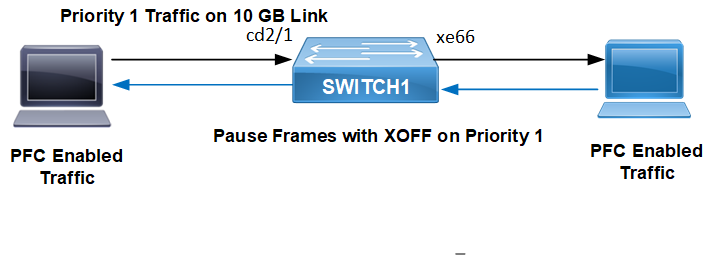
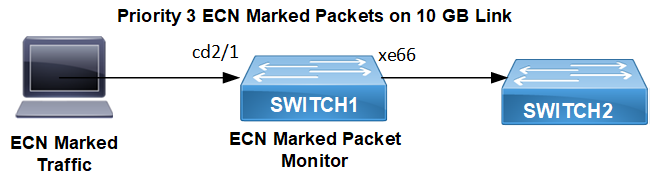
The topology uses a Switch1 with an ingress interface cd2/1 (connected to a node which generates traffic) and an egress interface xe66 (connected to destination node which receives the traffic). Congestion is induced on the egress interface xe66 using shapers within QoS policy maps.
The following topology shows PFC pause frame monitoring on the ingress and egress interfaces of Switch 1.
Figure 165. PFC Enabled Bridge
The following topology shows ECN Marked packets monitoring on the ingress and egress interfaces of Switch 1.
Figure 166. ECN Enabled Bridge
Configuration for ECN Marking and PFC Pausing
The following steps configure global setting for monitoring of PFC and ECN packets transmitted and received on an interface when monitoring is enabled in a Layer 3 routed scenario.
Before configuration meet all Prerequisites.
| 1. | Configure global settings - QoS, VLAN/Bridge, ingress port cd2/1 as a trunk port in bridge 1, allowing VLAN 2 and egress port on Switch 1. |
(config)#qos enable

(config)#vlan database
(config-vlan)#vlan-reservation 4001-4094
(config-vlan)#vlan 2 bridge 1 state enable

(config)#bridge 1 protocol rstp vlan-bridge

(config)#interface cd2/1
(config-if)#description Switch1
(config-if)#switchport
(config-if)#bridge-group 1
(config-if)#switchport mode trunk
(config-if)#switchport trunk allowed vlan add 2
(config-if)#load-interval 30
(config-if)#mtu 9216
ECN Configuration (Routing and ECN Marking)
Perform the following setup to enable ECN marking on congestion.
| 2. | Enable ingress L3 Switch Virtual Interface (SVI) for Vlan1.2 with IP 10.1.1.1/24. |
(config)#interface vlan1.2
(config-if)#ip address 10.1.1.1/24
(config-if)#mtu 9216| 3. | Configure egress port xe66 as a routed interface where congestion is applied. |
(config)#interface xe66
(config-if)#description Connected-Destination Node
(config-if)#load-interval 30
(config-if)#ip address 20.1.1.1/24
(config-if)#mtu 9216
(config-if)#service-policy type queuing output ECN
(config-if)#monitor ecn| 4. | Configure OSPF router to ensure reachability between the networks connected to vlan1.2 and xe66. |
(config)#router ospf 100
(config-router)#ospf router-id 1.1.1.1
(config-router)#network 1.1.1.1/32 area 0.0.0.0
(config-router)#network 10.1.1.0/24 area 0.0.0.0
(config-router)#network 20.1.1.0/24 area 0.0.0.0| 5. | Configure ECN policy map with queues q0, q1, q2, q4, q5 for priority lossless and q3 with shape 1 gbps to induce congestion, priority, and random-detect, packets ecn to enable ECN marking based on WRED thresholds. |
(config)#policy-map type queuing default ECN
(config-cmap-que)#class type queuing default q0
(config-cmap-que)#priority
(config-cmap-que)#lossless
(config-cmap-que)#exit
(config)#class type queuing default q1
(config-cmap-que)#priority
(config-cmap-que)#lossless
(config-cmap-que)#exit
(config)#class type queuing default q2
(config-cmap-que)#priority
(config-cmap-que)#lossless
(config-cmap-que)#exit
(config)#class type queuing default q3
(config-cmap-que)#shape 1 gbps
(config-cmap-que)#priority
(config-cmap-que)#random-detect green min-threshold 40 max-threshold 50 yellow min-threshold 70 max-threshold 80 red min-threshold 100 max-threshold 110 packets ecn
(config-cmap-que)#exit
(config)#class type queuing default q4
(config-cmap-que)#priority
(config-cmap-que)#lossless
(config-cmap-que)#exit
(config)#class type queuing default q5
(config-cmap-que)#priority
(config-cmap-que)#lossless
(config-cmap-que)#exit| 6. | Apply the ECN policy map to the egress interface xe66 using service-policy type queuing output ECN. Enable monitor ecn on xe66 to generate system logs for ECN marking events. Ensure PFC is not applied when only ECN is required. |
(config)#interface xe66
(config-if)#description Egress-interface
(config-if)#load-interval 30
(config-if)#ip address 20.1.1.1/24
(config-if)#mtu 9216
(config-if)#service-policy type queuing output ECN
(config-if)#monitor ecn
PFC Configuration (Routing and PFC Pausing)
Perform the following setup to enable PFC pausing instead of ECN marking on congestion.
| 7. | Configure PFC policy. |
(config)#policy-map type queuing default PFC
(config-cmap-que)#class type queuing default q0
(config-cmap-que)#priority
(config-cmap-que)#lossless
(config-cmap-que)#exit
(config)#class type queuing default q1
(config-cmap-que)#priority
(config-cmap-que)#lossless
(config-cmap-que)#exit
(config)#class type queuing default q2
(config-cmap-que)#priority
(config-cmap-que)#lossless
(config-cmap-que)#exit
(config)#class type queuing default q3
(config-cmap-que)#shape 1 gbps
(config-cmap-que)#priority
(config-cmap-que)#random-detect green min-threshold 40 max-threshold 50 yellow min-threshold 70 max-threshold 80 red min-threshold 100 max-threshold 110
(config-cmap-que)#exit
(config)#class type queuing default q4
(config-cmap-que)#priority
(config-cmap-que)#lossless
(config-cmap-que)#exit
(config)#class type queuing default q5
(config-cmap-que)#priority
(config-cmap-que)#lossless
(config-cmap-que)#exit| 8. | Enable PFC policy. |
OcNOS(config)#interface cd2/1
OcNOS(config-if)#switchport
OcNOS(config-if)#bridge-group 1
OcNOS(config-if)#switchport mode trunk
OcNOS(config-if)#switchport trunk allowed vlan all
OcNOS(config-if)#priority-flow-control mode on
OcNOS(config-if)#priority-flow-control enable priority 0 1 2 3 4
OcNOS(config-if)#load-interval 30
OcNOS(config-if)#mtu 9216
OcNOS(config-if)#monitor pfc
OcNOS(config-if)#shape rate 1 gbps burst 1000| 9. | Apply PFC policy. |
OcNOS(config)#interface xe66
OcNOS(config-if)#description Egress-port
OcNOS(config-if)# priority-flow-control mode on
OcNOS(config-if)#priority-flow-control enable priority 0 1 2 3 4
OcNOS(config-if)#load-interval 30
OcNOS(config-if)#ip address 20.1.1.1/24
OcNOS(config-if)#mtu 9216
OcNOS(config-if)#service-policy type queuing output PFC
Sample Show Running Configuration on Switch
For ECN
!
service password-encryption
!
logging console 5
logging monitor 5
logging level all 7
!
!
snmp-server enable traps link linkDown
snmp-server enable traps link linkUp
!
qos enable
!
hostname DUT1
port cd2 breakout 4X10g
bridge 1 protocol rstp vlan-bridge
tfo Disable
errdisable cause stp-bpdu-guard
data-center-bridging enable bridge 1
feature dns relay
ip dns relay
ipv6 dns relay
!
policy-map type queuing default ECN
 class type queuing default q0
  priority
  lossless
  exit
 class type queuing default q1
  priority
  lossless
  exit
 class type queuing default q2
  priority
  lossless
  exit
 class type queuing default q3
  shape 1 gbps
  priority
  random-detect green min-threshold 40 max-threshold 50 yellow min-threshold 70 max-threshold 80 red min-threshold 100 max-threshold 110 packets ecn
  exit
 class type queuing default q4
  priority
  lossless
  exit
 class type queuing default q5
  priority
  lossless
  exit
!
vlan database
 vlan-reservation 4001-4094
 vlan 2 bridge 1 state enable
!
ip vrf management
!
interface cd1
!
interface cd2/1
 description Connected-STC
 switchport
 bridge-group 1
 switchport mode trunk
 switchport trunk allowed vlan add 2
 load-interval 30
 mtu 9216
!
interface cd64
!
interface eth0
 ip vrf forwarding management
 ip address dhcp
!
interface lo
 ip address 127.0.0.1/8
 ip address 1.1.1.1/32 secondary
 ipv6 address ::1/128
!
interface lo.management
 ip vrf forwarding management
 ip address 127.0.0.1/8
 ipv6 address ::1/128
!
interface vlan1.2
 ip address 10.1.1.1/24
 mtu 9216
!
interface xe65
!
interface xe66
 description Connected-DUT2
 load-interval 30
 ip address 20.1.1.1/24
 mtu 9216
 service-policy type queuing output ECN
 monitor ecn
!
 exit
!
router ospf 100
 ospf router-id 1.1.1.1
 network 1.1.1.1/32 area 0.0.0.0
 network 10.1.1.0/24 area 0.0.0.0
 network 20.1.1.0/24 area 0.0.0.0
!
router bgp 65001
 bgp router-id 1.1.1.1
 bgp log-neighbor-changes
 neighbor underlay peer-group
 neighbor underlay remote-as 65001
 neighbor underlay authentication-key 0x52211cdd013e0b79
 neighbor underlay as-origination-interval 1
 neighbor underlay advertisement-interval 0
 neighbor underlay fall-over bfd
 !
 bgp unnumbered-mode
 neighbor xe66 peergroup underlay
 exit-unnumbered-mode
 !
 address-family ipv4 unicast
 max-paths ebgp 10
 max-paths ibgp 64
 redistribute connected
 neighbor underlay activate
 !
 bgp v4-unnumbered-mode
 exit-v4-unnumbered-mode
 !
 exit-address-family
 !l
 exit
!
!
end

!
#
For PFC
!
service password-encryption
!
logging console 5
logging monitor 5
logging level all 7
!
!
snmp-server enable traps link linkDown
snmp-server enable traps link linkUp
!
qos enable
!
hostname DUT1
port cd2 breakout 4X10g
bridge 1 protocol rstp vlan-bridge
tfo Disable
errdisable cause stp-bpdu-guard
data-center-bridging enable bridge 1
feature dns relay
ip dns relay
ipv6 dns relay
!
policy-map type queuing default PFC
 class type queuing default q0
  priority
  lossless
  exit
 class type queuing default q1
  priority
  lossless
  exit
 class type queuing default q2
  priority
  lossless
  exit
 class type queuing default q3
  shape 1 gbps
  priority
  exit
 class type queuing default q4
  priority
  lossless
  exit
 class type queuing default q5
  priority
  lossless
  exit
!
vlan database
 vlan-reservation 4001-4094
 vlan 2 bridge 1 state enable
!
ip vrf management
!
interface cd1
!
interface cd2/1
 description Connected-STC
 switchport
 bridge-group 1
 switchport mode trunk
 switchport trunk allowed vlan add 2
 priority-flow-control mode on
 priority-flow-control enable priority 0 1 2 3 4
 load-interval 30
 mtu 9216
 monitor pfc
!
interface cd64
!
interface eth0
 ip vrf forwarding management
 ip address dhcp
!
interface lo
 ip address 127.0.0.1/8
 ip address 1.1.1.1/32 secondary
 ipv6 address ::1/128
!
interface lo.management
 ip vrf forwarding management
 ip address 127.0.0.1/8
 ipv6 address ::1/128
!
interface vlan1.2
 ip address 10.1.1.1/24
 mtu 9216
!
interface xe65
!
interface xe66
 description Connected-DUT2
 priority-flow-control mode on
 priority-flow-control enable priority 0 1 2 3 4
 load-interval 30
 ip address 20.1.1.1/24
 mtu 9216
 service-policy type queuing output PFC
 monitor ecn
!
 exit
!
router ospf 100
 ospf router-id 1.1.1.1
 network 1.1.1.1/32 area 0.0.0.0
 network 10.1.1.0/24 area 0.0.0.0
 network 20.1.1.0/24 area 0.0.0.0
!
exit
!
!
end

!