Enable eBGP Multihop
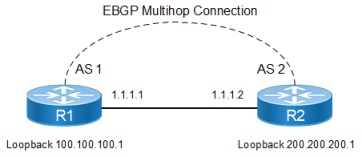
This example shows the minimum configuration required for enabling eBGP multihop on peers speaking BGP. eBGP multihop is used for routers that are not directly connected to each other. Typically, eBGP peers are directly connected, but if there is a requirement that necessitates this scenario, this configuration can be used.
The IP addresses used in the configuration should be accessible through an IGP or static routing.
Topology
Figure 38. eBGP Multihop Connection
R1
|
#configure terminal |
Enter configure mode. |
|
(config)#interface lo |
Enter loopback interface mode. |
|
(config-if)#ip address 100.100.100.1/24 secondary |
Specify IP address to the interface. |
|
(config-if)#exit |
Exit loopback interface mode. |
|
(config)#ip route 200.200.200.0/24 1.1.1.2 |
Specify route IP address. |
|
(config)#router bgp 1 |
Define the routing process. The number |
|
(config-router)#neighbor 200.200.200.1 remote-as 2 |
Define BGP neighbors, and establish a TCP session. 200.200.200.1 is the IP address of the neighbor (R2), and 2 is the neighbor’s AS number. |
|
(config-router)#neighbor 200.200.200.1 update-source lo |
Define BGP neighbors, to update the source routes. |
|
(config-router)#neighbor 200.200.200.1 ebgp-multihop |
Define the neighbor |
|
(config-router)#address-family ipv4 unicast |
Enter the Ipv4 Unicast Address Family. |
|
(config-router-af)# neighbor 200.200.200.1 activate |
Activate the neighbor under address family mode |
|
(config-router-af)# exit-address-family |
Exit address-family mode. |
|
(config-router)#commit |
Commit the candidate configuration to the running configuration. |
R2
|
#configure terminal |
Enter configure mode. |
|
(config)#interface lo |
Enter loopback interface mode. |
|
(config-if)#ip address 200.200.200.1/24 secondary |
Specify IP address to the interface. |
|
(config-if)#exit |
Exit loopback interface mode. |
|
(config)#ip route 100.100.100.0/24 1.1.1.1 |
Specify route IP address. |
|
(config)#router bgp 2 |
Define the routing process. The number 2 specifies the AS number of R1. |
|
(config-router)#neighbor 100.100.100.1 remote-as 1 |
Define BGP neighbors, and establish a TCP session. 100.100.100.1 is the IP address of the neighbor (R2), and 1 is the neighbor's AS number. |
|
(config-router)#neighbor 100.100.100.1 update-source lo |
Define BGP neighbors, to update the source routes. |
|
(config-router)#neighbor 100.100.100.1 ebgp-multihop |
Define the neighbor 100.100.100.1 for eBGP multihops. |
|
(config-router)#address-family ipv4 unicast |
Config redistribute under address-family |
|
(config-router-af)# neighbor 100.100.100.1 activate |
Activate the neighbor under address family mode |
|
(config-router-af)#redistribute static |
Redistribute static route |
|
(config-router-af)#exit-address-family |
Exit address-family mode |
|
(config-router)#commit |
Commit the candidate configuration to the running configuration. |
Validation
R1
 The following provides the R1 validation:
#show ip bgp neighbors
BGP neighbor is 200.200.200.1, remote AS 2, local AS 1, external link
  BGP version 4, local router ID 192.168.52.2, remote router ID 192.168.52.3
  BGP state = Established, up for 00:00:22
  Last read 00:00:22, hold time is 90, keepalive interval is 30 seconds
  Neighbor capabilities:
    Route refresh: advertised and received (old and new)
    Address family IPv4 Unicast: advertised and received
  Received 2 messages, 0 notifications, 0 in queue
  Sent 3 messages, 0 notifications, 0 in queue
  Route refresh request: received 0, sent 0
  Minimum time between advertisement runs is 30 seconds
  Update source is lo
 For address family: IPv4 Unicast
  BGP table version 1, neighbor version 1
  Index 1, Offset 0, Mask 0x2
  Community attribute sent to this neighbor (both)
  0 accepted prefixes
  0 announced prefixes

 Connections established 1; dropped 0
  External BGP neighbor may be up to 255 hops away.
Local host: 100.100.100.1, Local port: 179
Foreign host: 200.200.200.1, Foreign port: 59458
Nexthop: 100.100.100.1
Nexthop global: ::
Nexthop local: ::
BGP connection: non shared network


#show ip bgp
BGP table version is 4, local router ID is 192.168.52.2
Status codes: s suppressed, d damped, h history, * valid, > best, i - internal,
              l - labeled, S Stale
Origin codes: i - IGP, e - EGP, ? - incomplete

    Network          Next Hop            Metric    LocPrf       Weight Path
*>   100.100.100.0/24 200.200.200.1        0         100           0       2 ?

Total number of prefixes 1


#show ip bgp neighbors
BGP neighbor is 200.200.200.1, remote AS 2, local AS 1, external link
  BGP version 4, local router ID 192.168.52.2, remote router ID 192.168.52.3
  BGP state = Established, up for 00:00:26
  Last read 00:00:26, hold time is 90, keepalive interval is 30 seconds
  Neighbor capabilities:
    Route refresh: advertised and received (old and new)
    Address family IPv4 Unicast: advertised and received
  Received 5 messages, 0 notifications, 0 in queue
  Sent 6 messages, 1 notifications, 0 in queue
  Route refresh request: received 0, sent 0
  Minimum time between advertisement runs is 30 seconds
  Update source is lo
 For address family: IPv4 Unicast
  BGP table version 1, neighbor version 1
  Index 1, Offset 0, Mask 0x2
  Community attribute sent to this neighbor (both)
  0 accepted prefixes
  0 announced prefixes

 Connections established 2; dropped 1
  External BGP neighbor may be up to 255 hops away.
Local host: 100.100.100.1, Local port: 57260
Foreign host: 200.200.200.1, Foreign port: 179
Nexthop: 100.100.100.1
Nexthop global: ::
Nexthop local: ::
BGP connection: non shared network
Last Reset: 00:00:31, due to BGP Notification sent
Notification Error Message: (Cease/Administratively Reset.)
R2
The following provides the R2 validation:
#sh ip bgp neighbors
BGP neighbor is 100.100.100.1, remote AS 1, local AS 2, external link
  BGP version 4, local router ID 192.168.52.3, remote router ID 192.168.52.2
  BGP state = Established, up for 00:00:35
  Last read 00:00:05, hold time is 90, keepalive interval is 30 seconds
  Neighbor capabilities:
    Route refresh: advertised and received (old and new)
    Address family IPv4 Unicast: advertised and received
  Received 6 messages, 1 notifications, 0 in queue
  Sent 7 messages, 0 notifications, 0 in queue
  Route refresh request: received 0, sent 0
  Minimum time between advertisement runs is 30 seconds
  Update source is lo
 For address family: IPv4 Unicast
  BGP table version 1, neighbor version 1
  Index 1, Offset 0, Mask 0x2
  Community attribute sent to this neighbor (both)
  0 accepted prefixes
  0 announced prefixes

 Connections established 2; dropped 1
  External BGP neighbor may be up to 255 hops away.
Local host: 200.200.200.1, Local port: 179
Foreign host: 100.100.100.1, Foreign port: 57260
Nexthop: 200.200.200.1
Nexthop global: ::
Nexthop local: ::
BGP connection: non shared network
Last Reset: 00:00:40, due to BGP Notification received
Notification Error Message: (Cease/Administratively Reset.)

#show ip bgp
BGP table version is 4, local router ID is 192.168.52.3
Status codes: s suppressed, d damped, h history, * valid, > best, i - internal,
              l - labeled, S Stale
Origin codes: i - IGP, e - EGP, ? - incomplete

    Network          Next Hop            Metric    LocPrf       Weight Path
*>   100.100.100.0/24 1.1.1.1             0         100           32768    ?

Total number of prefixes 1