Route-Map
Use route maps to filter incoming updates from a BGP peer. In this example, the prefix-list ABC on R1 is configured to deny entry of any routes with the IP address 1.1.1.0/M (M = 26, 27, 28). To test the filter, R2 is configured to generate network addresses 1.1.1.0/27 and 1.1.2.0/24. To verify, use the show ip bgp command on R1; it displays R1 receiving updates from only 1.1.2.0/24.
Route maps enable filtering and modification of BGP routes using 'match' and 'set' clauses. They can be applied to a BGP peer or peer-group in either the inbound or outbound direction to influence received or advertised routes. However, for route-map updates to take effect, a manual command such as clear ip bgp A.B.C.D<neighbor> soft must be executed for each BGP peer or peer-group address-family. This manual step is required in all software releases except for release 6.6.x and later, provided that the 'bgp auto-policy-soft-reset enable' feature is configured.
Topology
Figure 23. Configure Route-Map
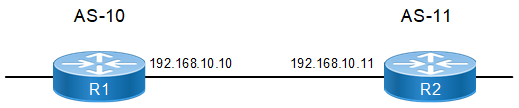
R1
|
#configure terminal |
Enter configure mode. |
|
(config)#ip prefix-list ABC |
Create an entry in the prefix-list. The ABC parameter is the name of the map that is created above. 5 specifies the sequence number or position of this specific route map. deny specifies the packets are to be rejected. 26 and 28 are the minimum and maximum prefix lengths to be matched. |
|
(config-ip-prefix-list)#seq 5 deny 1.1.1.0/24 ge 26 le 28 |
5 specifies the sequence number or position of this specific route map. deny specifies the packets are to be rejected. 26 and 28 are the minimum and maximum prefix lengths to be matched. |
|
(config-ip-prefix-list)#seq 10 permit any |
10 specifies the sequence number or position of this specific route map. The permit parameter any specifies accept all packets of any length. |
|
(config-ip-prefix-list)#exit
|
Exit the prefix-list mode |
|
(config)#commit |
Commit the candidate configuration to the running configuration. |
|
(config)#route-map ABC permit 1 |
Enter Route-map mode to set the match operation. |
|
(config-route-map)#match ip address prefix-list ABC |
Set the match criteria. In this case, if the route-map name matches ABC, the packets from the first sequence are denied. |
|
(config-route-map)#exit |
Exit Route-map mode, and return to Configure mode. |
|
(config)#router bgp 10 |
Define the routing process, and establish a TCP session. The number 10 specifies the AS number of R1. |
|
(config-router)#neighbor 192.168.10.11 remote-as 11 |
Define BGP neighbors, and establish a TCP session. 192.168.10.11 is the IP address of the neighbor (R2), and 11 is the neighbor's AS number. |
|
(config-router)# address-family ipv4 unicast |
Enter address-family ipv4 unicast mode |
|
(config-router-af)# neighbor 192.168.10.11 activate |
Activate the neighbor in the Ipv4 address family. |
|
(config-router-af)#neighbor 192.168.10.11 route-map ABC in |
Apply a route map to routes. 192.168.10.11 specifies the IP address of BGP neighbor. The ABC parameter is the name of the route map, and in specifies that the access list applies to incoming advertisements. |
|
(config-router-af)#exit-address-family |
Exit address-family mode. |
|
(config-router)#commit |
Commit the candidate configuration to the running configuration. |
R2
|
(config)#interface lo |
Enter loopback interface mode. |
|
(config-if)#ip address 1.1.1.1/27 secondary |
Specify the interface address. |
|
(config-if)#ip address 1.1.2.1/24 secondary |
Specify the interface address. |
|
(config-if)#exit |
Exit loopback interface mode. |
|
(config)#router bgp 11 |
Define the routing process, and establish a TCP session. The number |
|
(config-router)#neighbor 192.168.10.10 remote-as 10 |
Define BGP neighbors, and establish a TCP session. |
|
(config-router)# address-family ipv4 unicast |
Enter address-family ipv4 unicast mode |
|
(config-router-af)# neighbor 192.168.10.10 activate |
Activate the neighbor in the Ipv4 address family. |
|
(config-router-af)#network 1.1.1.0/27 |
Specify the network to be advertised by the BGP routing process. |
|
(config-router-af)#network 1.1.2.0/24 |
Specify the network to be advertised by the BGP routing process. |
|
(config-router-af)#exit-address-family |
Exit router mode. |
|
(config-router)#commit |
Commit the candidate configuration to the running configuration. |
Validation
#show  ip bgp
BGP table version is 2, local router ID is 192.168.52.2
Status codes: s suppressed, d damped, h history, * valid, > best, i - internal,
              l - labeled, S Stale
Origin codes: i - IGP, e - EGP, ? - incomplete

    Network          Next Hop            Metric    LocPrf       Weight Path
*>   1.1.2.0/24       192.168.10.11        0         100           0    11 i

Total number of prefixes 1