OSPF Authentication
There are three types of OSPF authentications--Null (Type 0), Simple Text (Type 1), and MD5 (Type 2). With Null authentication, routing exchanges over the network are not authenticated. In Simple Text authentication, the authentication type is the same for all routers that communicate using OSPF in a network. For MD5 authentication, configure a key and a key ID on each router. The router generates a message digest on the basis of the key, key ID, and OSPF packet, and adds it to the OSPF packet.
The authentication type can be configured on a per-interface basis or a per-area basis. Additionally, Interface and Area authentication can be used together. Area authentication is used for an area, and interface authentication is used for a specific interface in the area. If the Interface authentication type is different from the Area authentication type, the Interface authentication type overrides the Area authentication type. If the Authentication type is not specified for an interface, the Authentication type for the area is used. The authentication command descriptions contain details of each type of authentication.
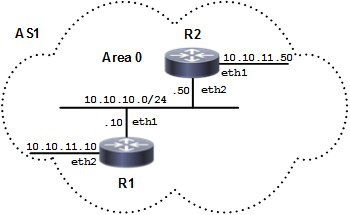
In the example below, R1 and R2 are configured for both the interface and area authentications. The authentication type of interface eth1 on R1 and interface eth2 on R2 is MD5 mode, and is defined by the area authentication command; however, the authentication type of interface eth2 on R1 and interface eth1 on R2 is plain text mode, and is defined by the ip ospf authentication command. This interface command overrides the area authentication command.
Topology
Figure 151. OSPF Authentication Topology
R1
|
#configure terminal |
Enter configure mode. |
|
(config)#router ospf 100 |
Configure the routing process, and specify the Process ID ( 100). The Process ID should be a unique positive integer identifying the routing process. |
|
(config-router)#network 10.10.10.0/24 area 0 |
Define interfaces on which OSPF runs, and associate the area ID |
|
(config-router)#network 10.10.11.0/24 area 0 |
Define interfaces on which OSPF runs, and associate the area ID |
|
(config-router)#area 0 authentication message-digest |
Enable MD5 authentication on area 0. |
|
(config-router)#exit |
Exit Router mode, and return to Configure mode. |
|
(config)#interface eth1 |
Enter interface mode. |
|
(config-if)# ip ospf message-digest-key 1 md5 0x293da85becc67703 |
Register the MD5 key test for OSPF authentication. The key ID is 1. |
|
(config-if)#exit |
Exit interface mode |
|
(config)#interface eth2 |
Enter interface mode. |
|
(config-if)#ip ospf authentication |
Enable the OSPF packet to use text authentication on the current interface ( |
|
(config-if)#ip ospf authentication-key 0x3a24102d157b1618 |
Specify an OSPF authentication password ( |
|
(config-if)#commit |
Commit the candidate configuration to the running configuration. |
R2
|
#configure terminal |
Enter configure mode. |
|
(config)#router ospf 100 |
Configure the routing process, and specify the Process ID ( 100). The Process ID should be a unique positive integer identifying the routing process. |
|
(config-router)#network 10.10.10.0/24 area 0 |
Define interfaces on which OSPF runs, and associate the area ID (0) with the interface (area ID 0 specifies the backbone area). |
|
(config-router)#network 10.10.11.0/24 area 0 |
Define interfaces on which OSPF runs, and associate the area ID (0) with the interface (area ID 0 specifies the backbone area). |
|
(config-router)#area 0 authentication message-digest |
Enable MD5 authentication on area 0. |
|
(config-router)#exit |
Exit Router mode, and return to Configure mode. |
|
(config)#interface eth2 |
Enter interface mode. |
|
(config-if)# ip ospf authentication-key 0x293da85becc67703 |
Register MD5 key test for OSPF authentication. The key ID is 1. |
|
(config-if)#exit |
Exit interface mode. |
|
(config)#interface eth1 |
Enter interface mode. |
|
(config-if)#ip ospf authentication |
Enable the OSPF packet to use text authentication on the current interface ( |
|
(config-if)# ip ospf message-digest-key 1 md5 0x293da85becc67703 |
Specify an OSPF authentication password |
|
(config-if)#commit |
Commit the candidate configuration to the running configuration. |
Validation
R1
 The following provides the R1 validation:
R1#sh running-config
!
no service password-encryption
!
hostname R1
!
logging monitor 7
!
ip vrf management
!
ip domain-lookup
!
ip pim register-rp-reachability
!
interface lo
 mtu 65536
 ip address 127.0.0.1/8
 ipv6 address ::1/128
!
interface eth0
 ip address 10.12.26.88/24
!
interface eth1
 ip address 10.10.10.10/24
 ip ospf message-digest-key 1 md5 0x293da85becc67703
!
interface eth2
 ip address 10.10.11.10/24
 ip ospf authentication
 ip ospf authentication-key 0x293da85becc67703
!
interface eth3
!
interface eth4
!
interface eth5
!
interface eth6
!
interface eth7
!
router ospf 100
 area 0.0.0.0 authentication message-digest
 network 10.10.9.0/24 area 0.0.0.0
 network 10.10.10.0/24 area 0.0.0.0
 network 10.10.11.0/24 area 0.0.0.0
 network 10.10.12.0/24 area 0.0.0.0

!
line con 0
 login
line vty 0 39
 login
!
end


R1#sh ip ospf neighbor

Total number of full neighbors: 1
OSPF process 100 VRF(default):
Neighbor ID     Pri   State            Dead Time   Address         Interface           Instance ID
10.12.26.89       1   Full/DR          00:00:38    10.10.10.50     eth1                    0
R2
The following provides the R1 validation:
R2#sh running-config
!
no service password-encryption
!
hostname R2
!
logging monitor 7
!
ip vrf management
!
ip domain-lookup
!
ip pim register-rp-reachability
!
interface lo
 mtu 65536
 ip address 127.0.0.1/8
 ipv6 address ::1/128
!
interface eth0
 ip address 10.12.26.89/24
!
interface eth1
 ip address 10.10.11.50/24
 ip ospf authentication
 ip ospf authentication-key 0x293da85becc67703
!
interface eth2
 ip address 10.10.10.50/24
 ip ospf message-digest-key 1 md5 0x293da85becc67703
 ip ospf cost 100
!
interface eth3
!
interface eth4
!
interface eth5
!
interface eth6
!
router ospf 100
 area 0.0.0.0 authentication message-digest
 network 10.10.10.0/24 area 0.0.0.0
 network 10.10.11.0/24 area 0.0.0.0

!
line con 0
 login
line vty 0 39
 login
!
end

R2#sh ip ospf neighbor

Total number of full neighbors: 1
OSPF process 100 VRF(default):
Neighbor ID     Pri   State            Dead Time   Address         Interface           Instance ID
10.12.26.88       1   Full/Backup      00:00:33    10.10.10.10     eth2                    0