Configuring 6PE
This section shows the configuration of 6PE.
Topology
As shown in Figure 13:
| • | CE1 and CE2 are customer edge routers |
| • | 6PE1 and 6PE2 are IPv6 Provider Edge routers |
| • | P is the router at the core of the IPv4 MPLS provider network |
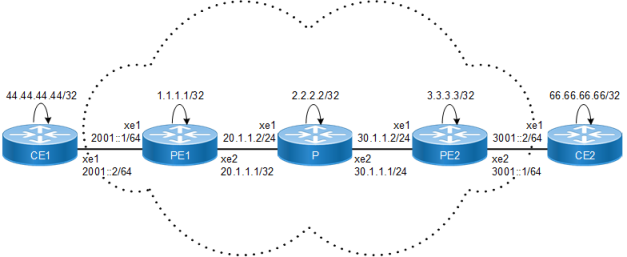
Configuration
CE1
|
#configure terminal |
Enter configure mode |
|
(config)#interface lo |
Enter interface mode |
|
(config-if)#ip address 44.44.44.44/32 secondary |
Assign the IPv4 address |
|
(config-if)#exit |
Exit interface mode |
|
(config)#interface xe1 |
Enter interface mode. |
|
(config-if)#ipv6 address 2001::2/64 |
Assign the IPv6 address. |
|
(config-if)#exit |
Exit interface mode. |
|
(config)#router bgp 200 |
Enter router BGP mode. |
|
(config-router)#bgp router-id 44.44.44.44 |
Assign router ID |
|
(config-router)#neighbor 2001::1 remote-as 100 |
Configure 6PE1 as an eBGP4+ neighbor |
|
(config-router)#address-family ipv6 unicast |
Enter Address-Family IPv6 unicast mode |
|
(config-router-af)#redistribute static |
Redistribute static routes |
|
(config-router-af)#neighbor 2001::1 activate |
Activate the neighbor in the IPv6 address family |
|
(config-router-af)#exit |
Exit address family |
|
(config-router)#ipv6 route 2ffe::/64 xe1 |
Configure IPV6 static route |
|
(config-router)#commit |
Commit the transaction |
CE2
|
#configure terminal |
Enter configure mode |
|
(config)#interface lo |
Enter interface mode |
|
(config-if)#ip address 66.66.66.66/32 secondary |
Assign the IPv4 address |
|
(config-if)#exit |
Exit interface mode |
|
(config)#interface xe1 |
Enter Interface mode |
|
(config-if)#ipv6 address 3002::2/64 |
Assign IPv6 address |
|
(config-if)#exit |
Exit interface mode |
|
(config)#router bgp 300 |
Enter BGP configure mode |
|
(config-router)#bgp router-id 66.66.66.66 |
Assign router ID |
|
(config-router)#neighbor 3002::1 remote-as 100 |
Configure 6PE2 as an eBGP4+ neighbor. |
|
(config-router)#address-family ipv6 unicast |
Enter Address-Family IPv6 unicast mode |
|
(config-router-af)#redistribute static |
Redistribute static routes |
|
(config-router-af)#neighbor 3002::1 activate |
Activate the neighbor in the IPv6 address family. |
|
(config-router-af)#exit |
Exit address family |
|
(config-router)#ipv6 route 3ffe::/64 xe1 |
Configure IPV6 static route |
|
(config-router)#commit |
Commit the transaction |
PE1
|
#configure terminal |
Enter configure mode |
|
(config)#interface xe1 |
Enter Interface mode |
|
(config-if)#ipv6 address 2001::1/64 |
Assign IPv6 address |
|
(config-if)#exit |
Exit interface mode |
|
(config)#interface lo |
Enter Interface mode |
|
(config-if)#ip address 1.1.1.1/32 secondary |
Assign the IP address to loopback interface |
|
(config-if)#exit |
Exit interface mode. |
|
(config)#router ldp |
Enter router ldp mode. |
|
(config-router)#router-id 1.1.1.1 |
Configure router-id |
|
(config-router)#explicit-null |
Configure explicit-null. |
|
(config-router)#transport-address ipv4 1.1.1.1 |
Configure transport address as loopback address |
|
(config-router)#targeted-peer ipv4 3.3.3.3 |
Configure targeted peer |
|
config-router-targeted-peer)#exit |
Exit router targeted mode |
|
(config-router)#exit |
Exit LDP mode |
|
(config)#interface xe2 |
Enter Interface mode |
|
(config-if)#ip address 20.1.1.1/24 |
Assign IPv4 address |
|
(config-if)#label-switching |
Enable label switching in interface. |
|
(config-if)#enable-ldp ipv4 |
Enable ldp in interface. |
|
(config-if)#exit |
Exit interface mode |
|
(config)#router ospf |
Enter router ospf mode. |
|
(config-router)#ospf router-id 1.1.1.1 |
Configure ospf router id same as loopback ip address. |
|
(config-router)#network 1.1.1.1/32 area 0 (config-router)#network 20.1.1.0/24 area 0 |
Define the network on which OSPF runs and associate area id. |
|
(config-router)#exit |
Exit from router ospf mode. |
|
(config)#mpls label mode 6pe per-prefix |
Change label mode to per-prefix, default is per VRF |
|
(config)#router bgp 100 |
Enter BGP Configure mode. |
|
(config-router)#bgp router-id 1.1.1.1 |
Configure BGP router-id |
|
(config-router)#neighbor 3.3.3.3 remote-as 100 |
Configure 6PE2 as an iBGP peer. |
|
(config-router)#neighbor 3.3.3.3 update-source lo |
Update the source as loopback for iBGP peering with the remote 6PE router. |
|
(config-router)#neighbor 2001::2 remote-as 200 |
Configure CE1 as eBGP peer |
|
(config-router)#address-family ipv4 unicast |
Enter address family mode |
|
(config-router-af)#neighbor 3.3.3.3 activate |
Activate neighbor |
|
(config-router-af)#exit |
Exit address family mode |
|
(config-router)#address-family ipv6 labeled- unicast |
Enter IPv6 labeled-unicast Address Family mode. |
|
(config-router-af)#neighbor 3.3.3.3 activate |
Activate the 6PE neighbor |
|
(config-router-af)#exit-address-family |
Exit IPv6 LU Address Family mode. |
|
(config-router)#address-family ipv6 unicast |
Enter the IPv6 address family |
|
(config-router-af)#neighbor 2001::2 activate |
Activate CE inside IPv6 address family |
|
(config-router-af)#redistribute connected |
Redistribute the connected routes |
|
(config-router-af)#exit |
Exit IPv6 Address Family mode. |
|
(config-router)#commit |
Commit the transaction. |
P1
|
#configure terminal |
Enter configure mode. |
|
(config)#interface lo |
Enter interface mode |
|
(config-if)#ip address 2.2.2.2/32 secondary |
Assign the IP address to the loopback interface |
|
(config-if)#exit |
Exit interface mode |
|
(config)#router ldp |
Enter router LDP mode. |
|
(config-router)#router-id 2.2.2.2 |
Configure router-id |
|
(config-router)#transport-address ipv4 2.2.2.2 |
Configure the transport address as the loopback address |
|
(config-router)#exit |
Exit router LDP mode. |
|
(config)#router ospf |
Enter router OSPF mode. |
|
(config-router)#ospf router-id 2.2.2.2 |
Configure the OSPF router ID to be the same as a loopback IP address. |
|
(config-router)#network 2.2.2.2/32 area 0 (config-router)#network 20.1.1.2/24 area 0 (config-router)#network 30.1.1.1/24 area 0 |
Define the network on which OSPF runs and associate the area ID. |
|
(config-router)#exit |
Exit from router ospf mode. |
|
(config)#interface xe2 |
Enter Interface mode |
|
(config-if)#ip address 30.1.1.1/24 |
Assign IPv4 address |
|
(config-if)#label-switching |
Enable label switching in interface. |
|
(config-if)#enable-ldp ipv4 |
Enable ldp in interface. |
|
(config-if)#exit |
Exit interface mode |
|
(config)#interface xe1 |
Enter Interface mode |
|
(config-if)#ip address 20.1.1.2/24 |
Assign IPv4 address |
|
(config-if)#label-switching |
Enable label switching in interface. |
|
(config-if)#enable-ldp ipv4 |
Enable ldp in interface. |
|
(config-if)#commit |
Commit the transaction. |
PE2
|
#configure terminal |
Enter configure mode |
|
(config)#interface xe2 |
Enter Interface mode |
|
(config-if)#ipv6 address 3002::1/64 |
Assign IPv6 address |
|
(config-if)#exit |
Exit interface mode |
|
(config)#interface lo |
Enter Interface mode |
|
(config-if)#ip address 3.3.3.3/32 secondary |
Assign the IP address to the loopback interface |
|
(config-if)#exit |
Exit interface mode. |
|
(config)#router ldp |
Enter router LDP mode. |
|
(config-router)#router-id 3.3.3.3 |
Configure router-id |
|
(config-router)#transport-address ipv4 3.3.3.3 |
Configure the transport address as the loopback address |
|
(config-router)#targeted-peer ipv4 1.1.1.1 |
Configure targeted peer |
|
(config-router-targeted-peer)#exit |
Exit-targeted-peer-mode |
|
(config-router)#explicit-null |
Configure explicit-null. |
|
(config-router)#exit |
Exit LDP mode |
|
(config)#interface xe1 |
Enter Interface mode |
|
(config-if)#ip address 30.1.1.2/24 |
Assign IPv4 address |
|
(config-if)#label-switching |
Enable label switching in the interface. |
|
(config-if)#enable-ldp ipv4 |
Enable LDP in the interface. |
|
(config-if)#exit |
Exit interface mode |
|
(config)#mpls label mode 6pe per-prefix |
Change label mode to per-prefix, the default is per VRF |
|
(config)#router bgp 100 |
Enter router BGP mode. |
|
(config-router)#bgp router-id 3.3.3.3 |
Configure the BGP router ID. |
|
(config-router)#neighbor 1.1.1.1 remote-as 100 |
Configure 6VPE2 as an iBGP peer. |
|
(config-router)#neighbor 1.1.1.1 update-source lo |
Update the source as loopback for iBGP peering with the remote 6VPE router. |
|
(config-router)#address-family ipv4 unicast |
Enter address family mode |
|
(config-router-af)#neighbor 1.1.1.1 activate |
Activate neighbor |
|
(config-router-af)#exit |
Exit address family mode |
|
(config-router)#neighbor 3002::2 remote-as 300 |
Configure CE1 as an eBGP peer |
|
(config-router)#address-family ipv6 labeled- unicast |
Enter IPv6 labeled-unicast Address Family mode. |
|
(config-router-af)#neighbor 1.1.1.1 activate |
Activate the 6PE neighbor |
|
(config-router-af)#exit-address-family |
Exit IPv6 LU Address Family mode. |
|
(config-router)#address-family ipv6 unicast |
Enter the IPv6 address family |
|
(config-router-af)#neighbor 3002::2 activate |
Activate CE inside the IPv6 address family |
|
(config-router-af)#redistribute connected |
Redistribute the connected routes |
|
(config-router-af)#exit-address-family |
Exit IPv6 Address Family mode. |
|
(config-router)#exit |
Exit Router mode. |
|
(config)#router ospf |
Enter OSPF router mode |
|
(config-router)#network 3.3.3.3/32 area 0 |
Enable OSPF with the specified area ID on interfaces with the IP address that matches the specified network address. |
|
(config-router)#network 30.1.1.0/24 area 0 |
Enable OSPF with the specified area ID on interfaces with the IP address that matches the specified network address |
|
(config-router)#commit |
Commit the transaction |