LDP Session Protection
LDP Session Protection is an optimization feature. It is used when directly connected LDP peer sessions (via multicast) become unavailable but still have IP reachability over a different path. LDP bindings are kept in the LIB to save time from full synchronization when the direct connections comes back up.
There are two types of LDP connections:
| • | Direct LDP Session - directly connected LSR, one hop away. |
| • | Targeted LDP Session - not directly connected LSR, multiple hops away. |
By default if the directly connected LDP session loses connectivity to its peer, all bindings are flushed from the LIB. When interfaces come up and LDP sessions are re-established, LDP has to synchronize its label bindings.
Enable session protection for indirect link failures to protect the labels until the session is active when multicast adjacency gets deleted. When multicast and TLDP connection exists between the same peer, the interface down notification is received only on the router with the link failure but not in the peer. When the interface goes down the multicast adjacency and the labels get deleted without notifying the peer device. When the interface comes up before the adjacency hold timer expires in the peer node, multicast adjacency is added and advertises the labels to the peer but does not receive any labels from the peer as there is no change in the adjacency.
LDP Session Protection is an optimization, when enabled, will not flush the LIB when direct LDP sessions go down. As long as there exists another path to the LDP Peer, it will maintain the LIB synchronized using Targeted LDP Session. IGP will cause a reroute, but the label bindings will still be present from the old peer. When interfaces come back up, LDP will not need to synchronize since it maintains the state using the targeted sessions.
| 1. | Running LDP Session Protection on a system requires the following tasks: |
| 2. | Enabling label-switching on the interface on NSM. |
| 3. | Enabling LDP on an interface in the LDP daemon. |
| 4. | Running an IGP (Internal Gateway Protocol), for example, OSPF, to distribute reachability information within the MPLS cloud. |
| 5. | Configuring the transport address. |
| 6. | Configuring LDP Session Protection. |
Figure 76. Basic LDP Topology
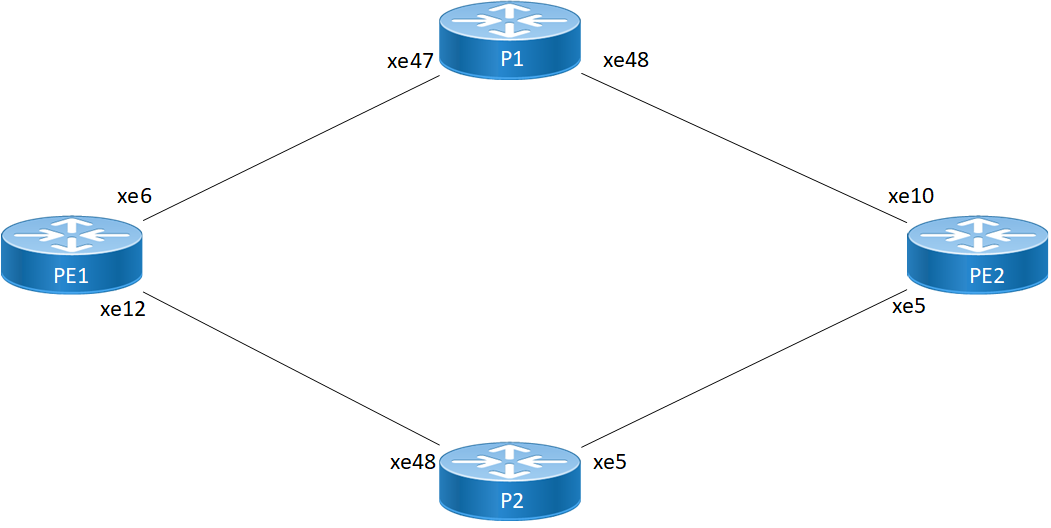
PE1 - NSM
|
#configure terminal |
Enter configure mode. |
|
(config)#interface xe6 |
Specify the interface (xe6) to be configured. |
|
(config-if)#ip address 10.10.10.1/24 |
Configure IPv4 address for xe6 |
|
(config-if)#label-switching |
Enable label switching on interface xe6. |
|
(config)#interface xe12 |
Specify the interface (xe12) to be configured. |
|
(config-if)#ip address 30.30.30.1/24 |
Configure IPv4 address for xe12 |
|
(config-if)#label-switching |
Enable label switching on interface xe12. |
|
(config-if)#exit |
Exit interface mode. |
|
(config)#interface lo |
Specify the loopback (lo) interface to be configured. |
|
(config-if)#ip address 1.1.1.1/32 |
Set the IP address of the loopback interface to 1.1.1.1/32. |
|
(config-if)#commit |
Commit the transaction. |
PE1 - LDP
|
(config)#router ldp |
Enter Router mode for LDP. |
|
(config-router)#router-id 1.1.1.1 |
Set the router ID to IP address 1.1.1.1 |
|
(config-router)#transport-address ipv4 1.1.1.1 |
Configure the transport address to be used for a TCP session over which LDP will run on an IPv4 interface. Note: It is preferable to use the loopback address as transport address. In addition, use the parameter "ipv6" if you are configuring an IPv6 interface. |
|
(config-router)#exit |
Exit the Router mode and return to the Configure mode. |
|
(config)#interface xe6 |
Enter interface mode. |
|
(config-if)#enable-ldp ipv4 |
Enable LDP on xe6. |
|
(config)#interface xe12 |
Enter interface mode. |
|
(config-if)#enable-ldp ipv4 |
Enable LDP on xe12. |
|
(config-if)#commit |
Commit the transaction. |
PE1 - OSPF
|
(config)#router ospf 1 |
Configure the routing process and specify the Process ID (1). The Process ID should be a unique positive integer identifying the routing process. |
|
(config-router)#ospf router-id 1.1.1.1 |
Configure Router ID |
|
(config-router)#network 1.1.1.1/32 area 0 |
Define the interface on which OSPF runs and associate the area ID (0) with the interface. |
|
(config-router)#network 10.10.10.1/24 area 0 |
Define the interface on which OSPF runs and associate the area ID (0) with the interface. |
|
(config-router)#network 30.30.30.1/24 area 0 |
Define the interface on which OSPF runs and associate the area ID (0) with the interface. |
|
(config-router)#commit |
Commit the transaction. |
P1 - NSM
|
#configure terminal |
Enter configure mode. |
|
(config)#interface xe47 |
Specify the interface (xe47) to be configured. |
|
(config-if)#ip address 10.10.10.2/24 |
Configure IPv4 address for xe47 |
|
(config-if)#label-switching |
Enable label switching on interface xe47. |
|
(config)#interface xe48 |
Specify the interface (xe48) to be configured. |
|
(config-if)#ip address 20.20.20.1/24 |
Configure IPv4 address for xe48 |
|
(config-if)#label-switching |
Enable label switching on interface xe48. |
|
(config-if)#exit |
Exit interface mode. |
|
(config)#interface lo |
Specify the loopback (lo) interface to be configured. |
|
(config-if)#ip address 2.2.2.2/32 secondary |
Set the IP address of the loopback interface to 2.2.2.2/32. |
|
(config-if)#commit |
Commit the transaction. |
P1 - LDP
|
(config)#router ldp |
Enter Router mode for LDP. |
|
(config-router)#router-id 2.2.2.2 |
Set the router ID to IP address 2.2.2.2 |
|
(config-router)#transport-address ipv4 2.2.2.2 |
Configure the transport address to be used for a TCP session over which LDP will run on an IPv4 interface. Note: It is preferable to use the loopback address as transport address. In addition, use the parameter "ipv6" if you are configuring an IPv6 interface. |
|
(config-router)#exit |
Exit the Router mode and return to the Configure mode. |
|
(config)#interface xe47 |
Enter interface mode. |
|
(config-if)#enable-ldp ipv4 |
Enable LDP on xe47. |
|
(config)#interface xe48 |
Enter interface mode. |
|
(config-if)#enable-ldp ipv4 |
Enable LDP on xe48. |
|
(config-if)#commit |
Commit the transaction. |
P1 - OSPF
|
(config)#router ospf 1 |
Configure the routing process and specify the Process ID (1). The Process ID should be a unique positive integer identifying the routing process. |
|
(config-router)#ospf router-id 2.2.2.2 |
Configure Router ID
|
|
(config-router)#network 2.2.2.2/32 area 0 |
Define the interface on which OSPF runs and associate the area ID (0) with the interface. |
|
(config-router)#network 10.10.10.2/24 area 0 |
Define the interface on which OSPF runs and associate the area ID (0) with the interface. |
|
(config-router)#network 20.20.20.1/24 area 0 |
Define the interface on which OSPF runs and associate the area ID (0) with the interface. |
|
(config-router)#commit |
Commit the transaction. |
P2 - NSM
|
#configure terminal |
Enter configure mode. |
|
(config)#interface xe48 |
Specify the interface (xe48) to be configured. |
|
(config-if)#ip address 30.30.30.2/24 |
Configure IPv4 address for xe48 |
|
(config-if)#label-switching |
Enable label switching on interface xe48. |
|
(config)#interface xe5 |
Specify the interface (xe5) to be configured. |
|
(config-if)#ip address 40.40.40.1/24 |
Configure IPv4 address for xe5 |
|
(config-if)#label-switching |
Enable label switching on interface xe5. |
|
(config-if)#exit |
Exit interface mode. |
|
(config)#interface lo |
Specify the loopback (lo) interface to be configured. |
|
(config-if)#ip address 4.4.4.4/32 secondary |
Set the IP address of the loopback interface to 4.4.4.4/32. |
|
(config-if)#commit |
Commit the transaction. |
P2 - LDP
|
(config)#router ldp |
Enter Router mode for LDP. |
|
(config-router)#router-id 4.4.4.4 |
Set the router ID to IP address 4.4.4.4 |
|
(config-router)#transport-address ipv4 4.4.4.4 |
Configure the transport address to be used for a TCP session over which LDP will run on an IPv4 interface. Note: It is preferable to use the loopback address as transport address. In addition, use the parameter "ipv6" if you are configuring an IPv6 interface. |
|
(config-router)#exit |
Exit the Router mode and return to the Configure mode. |
|
(config)#interface xe48 |
Enter interface mode. |
|
(config-if)#enable-ldp ipv4 |
Enable LDP on xe48. |
|
(config)#interface xe5 |
Enter interface mode. |
|
(config-if)#enable-ldp ipv4 |
Enable LDP on xe5. |
|
(config-if)#commit |
Commit the transaction. |
P2 - OSPF
|
(config)#router ospf 1 |
Configure the routing process and specify the Process ID (1). The Process ID should be a unique positive integer identifying the routing process. |
|
(config-router)#ospf router-id 4.4.4.4 |
Configure Router ID
|
|
(config-router)#network 4.4.4.4/32 area 0 |
Define the interface on which OSPF runs and associate the area ID (0) with the interface. |
|
(config-router)#network 20.20.20.2/24 area 0 |
Define the interface on which OSPF runs and associate the area ID (0) with the interface. |
|
(config-router)#network 30.30.30.1/24 area 0 |
Define the interface on which OSPF runs and associate the area ID (0) with the interface. |
|
(config-router)#commit |
Commit the transaction. |
PE2 - NSM
|
#configure terminal |
Enter configure mode. |
|
(config)#interface xe10 |
Specify the interface (xe10) to be configured. |
|
(config-if)#ip address 20.20.20.2/24 |
Configure IPv4 address for xe10 |
|
(config-if)#label-switching |
Enable label switching on interface xe10. |
|
(config)#interface xe5 |
Specify the interface (xe5) to be configured. |
|
(config-if)#ip address 40.40.40.2/24 |
Configure IPv4 address for xe5 |
|
(config-if)#label-switching |
Enable label switching on interface xe5. |
|
(config-if)#exit |
Exit interface mode. |
|
(config)#interface lo |
Specify the loopback (lo) interface to be configured. |
|
(config-if)#ip address 3.3.3.3/32 secondary |
Set the IP address of the loopback interface to 3.3.3.3/32. |
|
(config-if)#commit |
Commit the transaction. |
PE2 - LDP
|
(config)#router ldp |
Enter Router mode for LDP. |
|
(config-router)#router-id 3.3.3.3 |
Set the router ID to IP address 3.3.3.3 |
|
(config-router)#transport-address ipv4 3.3.3.3 |
Configure the transport address to be used for a TCP session over which LDP will run on an IPv4 interface. Note: It is preferable to use the loopback address as transport address. In addition, use the parameter "ipv6" if you are configuring an IPv6 interface. |
|
(config-router)#exit |
Exit the Router mode and return to the Configure mode. |
|
(config)#interface xe10 |
Enter interface mode. |
|
(config-if)#enable-ldp ipv4 |
Enable LDP on xe10. |
|
(config)#interface xe5 |
Enter interface mode. |
|
(config-if)#enable-ldp ipv4 |
Enable LDP on xe5. |
|
(config-if)#commit |
Commit the transaction. |
PE2 - OSPF
|
(config)#router ospf 1 |
Configure the routing process and specify the Process ID (1). The Process ID should be a unique positive integer identifying the routing process. |
|
(config-router)#ospf router-id 3.3.3.3 |
Configure Router ID |
|
(config-router)#network 3.3.3.3/32 area 0 |
Define the interface on which OSPF runs and associate the area ID (0) with the interface. |
|
(config-router)#network 20.20.20.2/24 area 0 |
Define the interface on which OSPF runs and associate the area ID (0) with the interface. |
|
(config-router)#network 40.40.40.2/24 area 0 |
Define the interface on which OSPF runs and associate the area ID (0) with the interface. |
|
(config-router)#commit |
Commit the transaction. |