Understanding MPLS TTL Processing
This chapter contains configurations for MPLS-TTL-Processing. It also provides an overview of MPLS-TTL-Processing concepts.
Overview
This feature performs ‘Time To Live’ (TTL) processing for Multi-Protocol Label Switching (MPLS) packets. The TTL processing is decided by the model chosen by you. This feature provides TTL processing of MPLS packets on ingress, egress, and intermediate routers. TTL processing is compliant with RFC 3443.
The details of TTL processing vary with the tunnel model that is configured for TTL processing. The incoming and outgoing TTL of the packet is determined by the configured tunnel model. Two Models are supported, pipe model and uniform model. Pipe model is default, where MPLS header TTL Value wont get propagated to IP header.
While pipe mode is the default, you can choose the uniform model with the mpls lsp-model uniform command.
For more about the uniform model and pipe models, see .
Topology
Figure 16. TTL Processing Topology
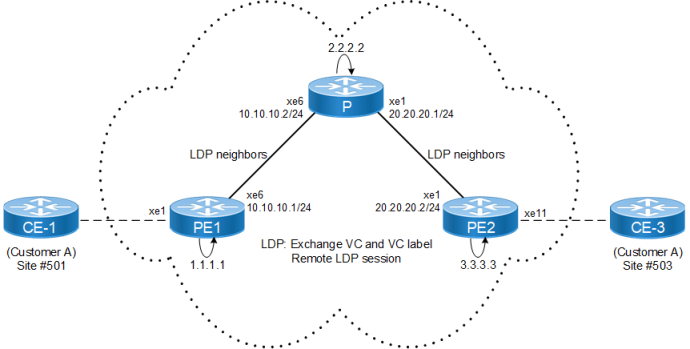
Configuration
PE1
|
PE1#configure terminal |
Enter configure mode |
|
PE1(config)#interface lo |
Enter interface mode. |
|
PE1(config-if)#ip address 1.1.1.1/32 secondary |
Configure IP address for the loopback address |
|
PE1(config-if)#exit |
Exit interface mode |
|
PE1(config)#interface xe6 |
Specify the interface (xe6)to be configured |
|
PE1(config-if)#ip address 10.10.10.1/24 |
Configure IP address for the interface |
|
PE1(config-if)#no shutdown |
Administratively bringing up the interface |
|
PE1(config-if)#exit |
Exit interface mode |
|
PE1(config)#router ospf 100 |
Configure the routing process and specify the Process ID (100) |
|
PE1(config-router)#ospf router-id 1.1.1.1 |
Configure ospf router id same as loopback ip address. |
|
PE1(config-router)#network 10.10.10.0/24 area 0 PE1(config-router)#network 1.1.1.1/32 area 0 |
Define the interface on which OSPF runs and associate the area ID(0)with the interface |
|
PE1(config-router)#exit |
Exit configure mode |
|
PE1(config)#router ldp |
Enter router mode for LDP |
|
PE1(config-router)#router-id 1.1.1.1 |
Set the router ID to IP address 1.1.1.1 |
|
PE1(config-router)#transport-address ipv4 1.1.1.1 0
|
Configure the transport address for IPV4 (for IPV6 use ipv6) to be used for a TCP session over which LDP will run. Note: It is preferable to use the loopback address as the transport address. |
|
PE1(config-router)#targeted-peer ipv4 3.3.3.3 |
Configure targeted peer. |
|
PE1(config-router)#exit |
Exit router mode for LDP |
|
PE1(config)#interface xe6 |
Specify the interface (xe6)to be configured |
|
PE1(config-if)#label-switching |
Enabling label switching capability on router |
|
PE1(config-if)#enable-ldp ipv4 |
Enabling ldp on interface |
|
PE1(config-if)#commit |
Commit the transaction |
P
|
P#configure terminal |
Enter configure mode. |
|
P(config)#interface lo |
Enter interface mode. |
|
P(config-if)#ip address 2.2.2.2/32 secondary |
Configure IP address for the loopback address |
|
P(config-if)#exit |
Exit interface mode |
|
P(config)#interface xe6 |
Specify the interface (xe6)to be configured |
|
P(config-if)#ip address 10.10.10.2/24 |
Configure IP address for the interface |
|
P(config-if)#no shutdown |
Administratively bringing up the interface |
|
P(config)#interface xe1 |
Specify the interface (xe1)to be configured |
|
P(config-if)#ip address 20.20.20.1/24 |
Configure IP address for the interface |
|
P(config)#router ospf 100 |
Configure the routing process and specify the Process ID (100) |
|
P(config-router)#ospf router-id 2.2.2.2 |
Configure OSPF router id same as loopback IP address. |
|
P(config-router)#network 10.10.10.0/24 area 0 P(config-router)#network 20.20.20.0/24 area 0 P(config-router)#network 2.2.2.2/32 area 0 |
Define the interface on which OSPF runs and associate the area ID (0)with the interface |
|
P(config-router)#exit |
Exit router mode |
|
P(config)#router ldp |
Enter router mode for LDP |
|
P(config-router)#router-id 2.2.2.2 |
Set the router ID to IP address 2.2.2.2 |
|
P(config-router)#transport-address ipv4 2.2.2.2 0
|
Configure the transport address for IPV4 (for IPV6 use ipv6) to be used for a TCP session over which LDP will run. Note: It is preferable to use the loopback address as the transport address. |
|
P(config-router)#exit |
Exit router mode for LDP |
|
P(config)#interface xe6 |
Specify the interface (xe6)to be configured |
|
P(config-if)#label-switching |
Enabling label switching capability on router |
|
P(config-if)#enable-ldp ipv4 |
Enabling ldp on interface |
|
P(config)#interface xe1 |
Specify the interface (xe1)to be configured |
|
P(config-if)#label-switching |
Enabling label switching capability on router |
|
P(config-if)#enable-ldp ipv4 |
Enabling ldp on interface |
|
P(config-if)#commit |
Commit the transaction |
PE2
|
PE2#configure terminal |
Enter configure mode. |
|
PE2(config)#interface lo |
Enter interface mode. |
|
PE2(config-if)#ip address 3.3.3.3/32 secondary |
Configure IP address for the loopback address |
|
PE2(config-if)#exit |
Exit interface mode |
|
PE2(config)#interface xe1 |
Specify the interface (xe1)to be configured |
|
PE2(config-if)#ip address 20.20.20.2/24 |
Configure IP address for the interface |
|
PE2(config-if)#no shutdown |
Administratively bringing up the interface |
|
PE2(config-if)#exit |
Exit interface mode |
|
PE2(config)#router ospf 100 |
Configure the routing process and specify the Process ID (100) |
|
PE2(config-router)#ospf router-id 3.3.3.3 |
Configure OSPF router ID same as loopback IP address. |
|
PE2(config-router)#network 20.20.20.0/24 area 0 PE2(config-router)#network 3.3.3.3/32 area 0 |
Define the interface on which OSPF runs and associate the area ID (0)with the interface |
|
PE2(config)#router ldp |
Enter router mode for LDP |
|
PE2(config-router)#router-id 3.3.3.3 |
Set the router ID to IP address 3.3.3.3 |
|
PE2(config-router)#transport-address ipv4 3.3.3.3 0 |
Configure the transport address for IPV4 (for IPV6 use ipv6) to be used for a TCP session over which LDP will run. Note: It is preferable to use the loopback address as the transport address. |
|
PE2(config-router)#targeted-peer ipv4 1.1.1.1 |
Configure targeted peer. |
|
PE2 (config-router-targeted-peer)#exit |
Exit-targeted-peer-mode |
|
PE2(config-router)#exit |
Exit router mode for LDP |
|
PE2(config)#interface xe1 |
Specify the interface (xe1)to be configured |
|
PE2(config-if)#label-switching |
Enabling label switching capability on router |
|
PE2(config-if)#enable-ldp ipv4 |
Enabling ldp on interface |
|
PE2(config-if)#commit |
Commit the transaction |
Validation
PE1#show ip ospf neighbor
Total number of full neighbors: 1
OSPF process 100 VRF(default):
Neighbor ID     Pri   State            Dead Time   Address         Interface           Instance ID
2.2.2.2      1   Full/DR          00:00:31    10.10.10.2      xe6                   0

PE1#show ldp session
Peer IP Address           IF Name    My Role    State      KeepAlive  UpTime
3.3.3.3                   xe6       Passive   OPERATIONAL   30    00:03:03
2.2.2.2                   xe6       Passive   OPERATIONAL   30    00:03:46


P#show ip ospf neighbor

Total number of full neighbors: 2
OSPF process 100 VRF(default):
Neighbor ID     Pri   State            Dead Time   Address         Interface           Instance ID
1.1.1.1              1   Full/Backup      00:00:37    10.10.10.1      xe6                   0
3.3.3.3      1   Full/DR          00:00:34    20.20.20.2      xe1                   0

P#show ldp session
Peer IP Address           IF Name    My Role    State      KeepAlive  UpTime
3.3.3.3                   xe1       Passive   OPERATIONAL   30    00:06:21
1.1.1.1                   xe6       Active    OPERATIONAL   30    00:06:39


PE2#show ip ospf neighbor

Total number of full neighbors: 1
OSPF process 100 VRF(default):
Neighbor ID     Pri   State            Dead Time   Address         Interface           Instance ID
2.2.2.2      1   Full/Backup      00:00:37    20.20.20.1      xe1                    0

PE2#show ldp session
Peer IP Address           IF Name    My Role    State      KeepAlive  UpTime
1.1.1.1                   xe1       Active    OPERATIONAL   30    00:06:07
2.2.2.2                   xe1       Active    OPERATIONAL   30    00:06:33


PE1#ping 3.3.3.3
Press CTRL+C to exit
PING 3.3.3.3 (3.3.3.3) 56(84) bytes of data.
64 bytes from 3.3.3.3: icmp_seq=1 ttl=63 time=2.17 ms
64 bytes from 3.3.3.3: icmp_seq=2 ttl=63 time=2.26 ms
64 bytes from 3.3.3.3: icmp_seq=3 ttl=63 time=2.11 ms
64 bytes from 3.3.3.3: icmp_seq=4 ttl=63 time=1.91 ms

--- 3.3.3.3 ping statistics ---
4 packets transmitted, 4 received, 0% packet loss, time 8ms
rtt min/avg/max/mdev = 1.912/2.112/2.261/0.127 ms


PE1#traceroute 2.2.2.2
traceroute to 2.2.2.2 (2.2.2.2), 30 hops max, 60 byte packets
 1  2.2.2.2 (2.2.2.2)  1.172 ms  0.918 ms  0.983 ms

PE1#traceroute 3.3.3.3
traceroute to 3.3.3.3 (3.3.3.3), 30 hops max, 60 byte packets
 1  * * *
 2  3.3.3.3 (3.3.3.3)  5.440 ms  5.215 ms  5.305 ms