DNS Relay Configuration
Overview
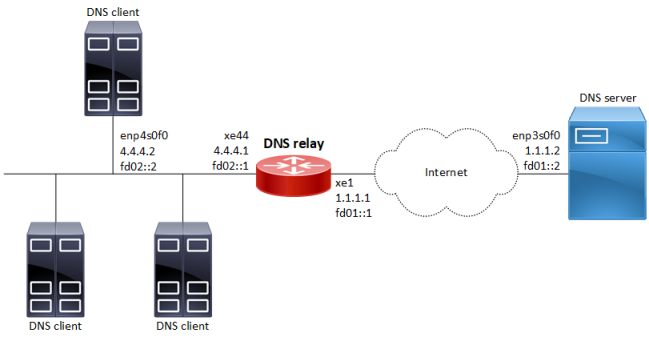
DNS relay is used to forward DNS request and reply packets between the DNS client and DNS server. In the network where DNS relay is used, the DNS client sends DNS request packets to the DNS relay. The DNS relay forwards request packets to the DNS server and sends reply packets to the DNS client, and domain resolution is realized.
Configuration
Topology
Figure 34. DNS relay configuration
Linux Configuration on the DNS client
sudo ifconfig enp4s0f0 4.4.4.2/24sudo ifconfig enp4s0f0 inet6 add fd02::2/16echo nameserver fd02::1 >> /etc/resolv.confecho nameserver 4.4.4.1 >> /etc/resolv.conf
Linux Configuration on the DNS server
sudo ifconfig enp3s0f0 1.1.1.2/24sudo ifconfig enp3s0f0 inet6 add fd01::2/16-
Install and configure BIND9:
Maximum of 10 bind9 instances is supported.
apt-get -y update && apt install -y bind9-
Configure 'forwarders' section in the
/etc/bind/named.conf.optionsfile like this:Copyforwarders { 8.8.8.8; 2001:4860:4860::8888; };
DNS Relay Router
|
#configure terminal |
Enter configure mode |
|
(config)#ip dns relay address 1.1.1.2 |
Set the IPv4 address of a DNS server |
|
(config)#ipv6 dns relay address fd01::2 |
Set the IPv6 address of a DNS server |
|
(config)#commit |
Commit the configuration |
|
(config)#interface xe44 |
Enter interface mode (interface connected to client) |
|
(config-if)#ip address 4.4.4.1/24 |
Assign an IPv4 address to the interface |
|
(config-if)#ip dns relay |
Set the interface as a DNS relay client-facing IPv4 port |
|
(config-if)#ipv6 address fd02::1/16 |
Assign an IPv6 address to the interface |
|
(config-if)#ipv6 dns relay |
Set the interface as a DNS relay client-facing IPv6 port |
|
(config-if)#commit |
Commit the configuration |
|
(config)#interface xe1 |
Enter interface mode (interface connected to server) |
|
(config-if)#ip address 1.1.1.1/24 |
Assign an IPv4 address to the interface |
|
(config-if)#ip dns relay uplink |
Set the interface as a DNS relay server-facing IPv4 port |
|
(config-if)#ipv6 address fd01::1/16 |
Assign an IPv6 address to the interface |
|
(config-if)#ipv6 dns relay uplink |
Set the interface as a DNS relay server-facing IPv6 port |
|
(config-if)#commit |
Commit the configuration |
|
(config)#exit |
Exit configure mode |
Validation
#sh run dns relay
!
ip dns relay address 1.1.1.2
!
ipv6 dns relay address fd01::2
!
interface xe1
 ip dns relay uplink
 ipv6 dns relay uplink
!
interface xe44
 ip dns relay
 ipv6 dns relay
!
#show running-config interface xe1
!
interface xe1
 ip address 1.1.1.1/24
 ipv6 address fd01::1/16
 ip dns relay uplink
 ipv6 dns relay uplink
!
#show running-config interface xe44
!
interface xe44
 ip address 4.4.4.1/24
 ipv6 address fd02::1/16
 ip dns relay
 ipv6 dns relay
!
Verify DNS Query result on DNS client machine:
[root@localhost ~]# host google.com
google.com has address 172.217.160.238
google.com has IPv6 address 2404:6800:4002:804::200e
google.com mail is handled by 40 alt3.aspmx.l.google.com.
google.com mail is handled by 10 aspmx.l.google.com.
google.com mail is handled by 50 alt4.aspmx.l.google.com.
google.com mail is handled by 30 alt2.aspmx.l.google.com.
google.com mail is handled by 20 alt1.aspmx.l.google.com.