Configuration
The following configuration enables the IPFIX feature on the OcNOS device, facilitating the collection and export of flow-specific information for network traffic analysis and management.
Topology
In this topology, simulated ingress traffic is routed through an OcNOS device equipped with IPFIX Exporter functionality before being transmitted to the collector.
The collector should be operational and actively listening on the configured IP address and port. Additionally, it should be reachable from the OcNOS node.
Figure 56. IPFIX Exporter
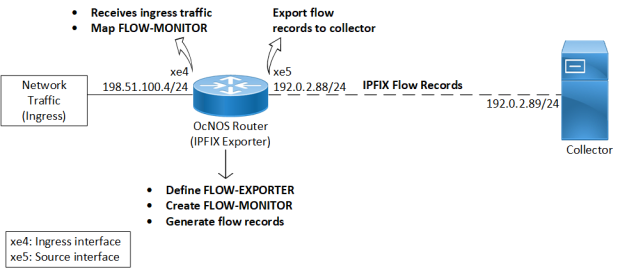
The following commands configure the IPFIX Exporter in OcNOS, enabling the collection and export of flow-specific information for ingress traffic analysis and management. For additional information on each command, refer to the IPFIX Commands section.
Ensure all are met before proceeding with the configuration.
-
Define an IP Flow Exporter for flow records:
When configuring the IP flow exporter (
FLOW-EXPORTER), designate the source interface (xe5) for generating flow data and specify the destination collector IP address (192.0.2.89) and UDP port (90) for receiving the exported data. Assign a unique template ID (500) to ensure proper interpretation of the flow records, with templates refreshed at intervals of600seconds for accuracy. Also, set the number of flow samples per export message to1to determine the granularity of the exported data.CopyOcNOS(config)#ip-flow-exporter FLOW-EXPORTER
OcNOS(ip-flow-exporter)#source xe5
OcNOS(ip-flow-exporter)#collector 192.0.2.89 udp-port 90
OcNOS(ip-flow-exporter)#template-id 500
OcNOS(ip-flow-exporter)#template-refresh-interval 600
OcNOS(ip-flow-exporter)#samples-per-message 1 -
Create an IP Flow Monitor profile:
Establish a flow monitor (
FLOW-MONITOR) to track network flows. Link it with the exporter (FLOW-EXPORTER) to transmit monitored flow data. Define a sampling rate1024to sample every 1024th packet for flow monitoring. Set the observation domain identifier (16) to identify the flow monitoring domain uniquely.CopyOcNOS(config)#ip-flow-monitor FLOW-MONITOROcNOS
OcNOS(ip-flow-monitor)#flow-exporter FLOW-EXPORTER
OcNOS(ip-flow-monitor)#sampling-rate 1024
OcNOS(ip-flow-monitor)#observation-domain-id 16 -
Map the flow monitor to the ingress interface:
Associate the IP Flow Monitor profile
FLOW-MONITORto the ingress interfacexe4to monitor traffic.CopyOcNOS(config)#interface xe4
OcNOS(config-if)#ip address 198.51.100.4/24
OcNOS(config-if)#flow-monitor FLOW-MONITOR
Validation
-
Verify the IPFIX exporter named
FLOW-EXPORTERhas been configured with the correct parameters using the output of the show ipfix command.CopyOcNOS#show ipfix
Exporters:
Name: FLOW-EXPORTER
Source: 192.0.2.88
Destination: 192.0.2.89
Source UDP: 53859
Destination UDP: 4739
Template ID: 500
Data Template Timeout:600 -
Check the exported fields in IPFIX data using the output of the show ipfix all command. Confirm the template ID and examine the list of fields in the template. These fields define the information captured in the flow records, including source and destination IP addresses, port numbers, and protocol details.
CopyOcNOS#show ipfix all
Templates:
Template ID: 500
DIRECTON (61), Length:1
IP_VERSION (60), Length:1
IPV4_TOS (5), Length:1
IPV4_PKT_LEN (1), Length:2
IPV4_FRAG_OFFSET (88), Length:2
PROTOCOL (4), Length:1
IPV4_SIP (8), Length:4
IPV4_DIP (12), Length:4
L4_SRC_PORT (7), Length:2
L4_DST_PORT (11), Length:2
TCP_CONTROL (6), Length:2
ICMP_TYPE (32), Length:2
INGRESS_VRF (234), Length:4
INGRESS_IF (10), Length:2
EGRESS_VRF (235), Length:4
EGRESS_IF (14), Length:2
SYS_UPTIME (22), Length:4
Exporters:
Name: FLOW-EXPORTER
Source: 192.0.2.88
Destination: 192.0.2.89
Source UDP: 53859
Destination UDP: 4739
Template ID: 500
Data Template Timeout:600 -
Confirm the accuracy of the IPFIX-related configurations by examining the output of the show running-config ipfix command. Ensure the IP flow exporter and monitor profiles are properly configured with the correct parameters.
CopyOcNOS#show running-config ipfix
hardware-profile statistics cfm-lm enable
!
ip-flow-exporter FLOW-EXPORTER
source xe5
collector destination 192.0.2.89
template-id 500
template-refresh-interval 600
samples-per-message 1
!
ip-flow-monitor FLOW-MONITOR
flow-exporter FLOW-EXPORTER
sampling-rate 1024
observation-domain-id 16
!
interface xe4
ip address 198.51.100.4/24
flow-monitor FLOW-MONITOR
!
interface xe5
ip address 192.0.2.88/24
! -
Check the association of the IP flow monitor with the ingress interface (
xe4) of the exporter device by examining the output of theshow running-config interfacecommand.CopyOcNOS#show running-config interface xe4
!
interface xe4
ip address 198.51.100.4/24
flow-monitor FLOW-MONITOR
!