PTP G.8275.2 Profile Source IP as Loopback Configuration
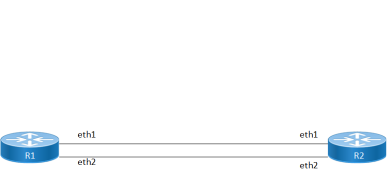
This section shows how to configure a PTP G.8275.2 profile source IP as Loopback over IPv4 and IPv6. You configure T-GM and boundary clock with more than one port.
Topology
Figure 7. Configuration topology
Configuration
This section shows how to set up a G.8275.2 Profile with loopback using as source IP
R1 (TGM)
|
#configure terminal |
Enter Configure mode |
|
(config)#interface lo |
Configure loopback interface lo |
|
(config-if)#ip address 1.1.1.1/32 secondary |
Configure the IP address of the loopback interface. |
|
(config-if)#interface eth1 |
Configure interface eth1 |
|
(config-if)#ip address 192.168.4.101/24 |
Configure the IP address of the interface. |
|
(config-if)#interface eth2 |
Configure interface eth2 |
|
(config-if)#ip address 10.1.1.1/24 |
Configure the IP address of the interface. |
|
(config-if)#exit |
Exit interface mode |
|
(config)#ptp clock 0 profile g8275.2 |
Enables G8275.2 for PTP time/phase telecom profile |
|
(config-ptp-clk)#number-ports 2 |
Configure the number of PTP ports on the instance |
|
(config-ptp-clk)#clock-port 1 |
Configure ptp port |
|
(config-clk-port)#transport ipv4 |
Set transport type ipv4 |
|
(config-clk-port)# source-address ipv4 interface lo |
Configure underlying loopback source interface that is used by this PTP Port |
|
(config-clk-port)#network-interface eth1 |
Configure underlying interface that is used by this PTP Port |
|
(config-clk-port)#exit |
Exit ptp clock port mode |
|
(config-ptp-clk)#clock-port 2 |
Configure ptp port |
|
(config-clk-port)#transport ipv4 |
Set transport type ipv4 |
|
(config-clk-port)# source-address ipv4 interface lo |
Configure underlying loopback source interface that is used by this PTP Port |
|
(config-clk-port)#network-interface eth2 |
Configure underlying interface that is used by this PTP Port |
|
(config-clk-port)#exit |
Exit ptp clock port mode |
R2 (Boundary clock)
|
#configure terminal |
Enter Configure mode |
|
(config)#interface eth1 |
Configure interface eth1 |
|
(config-if)#ip address 192.168.4.100/24 |
Configure the IP address of the interface. |
|
(config-if)#interface lo |
Configure interface loopback |
|
(config-if)#ip address 2.2.2.2/32 secondary |
Configure the loopback IP address of the interface. |
|
(config)#interface eth2 |
Configure interface eth2 |
|
(config-if)#ip address 10.1.1.2/24 |
Configure the IP address of the interface. |
|
(config-if)#exit |
Exit interface mode |
|
(config-if)#ip route 1.1.1.1/32 192.168.4.100 |
Configure the static route to reach other network |
|
(config-if)#ip route 1.1.1.1/32 10.1.1.1 |
Configure the static route to reach other network |
|
(config-if)#exit |
Exit interface mode |
|
(config)#ptp clock 0 profile g8275.2 |
Enables G8275.2 for PTP time/phase telecom profile |
|
(config-ptp-clk)#number-ports 3 |
Configure the number of PTP ports on the instance |
|
(config-ptp-clk)#clock-port 1 |
Configure ptp port |
|
(config-clk-port)#transport ipv4 |
Set transport type ipv4 |
|
(config-clk-port)#network-interface eth1 |
Configure underlying interface that is used by this PTP Port |
|
(config-clk-port)#master ipv4 1.1.1.1 |
Set master clock source address using loopback ip |
|
(config-clk-port)#exit |
Exit ptp clock port mode |
|
(config-ptp-clk)#clock-port 2 |
Configure ptp port |
|
(config-clk-port)#transport ipv4 |
Set transport type ipv4 |
|
(config-clk-port)#network-interface eth2 |
Configure underlying interface that is used by this PTP Port |
|
(config-clk-port)#master ipv4 1.1.1.1 |
Set master clock source address |
|
(config-clk-port)#exit |
Exit ptp clock port mode |