DHCP Relay for IPv4
Before configuring DHCP Relay, make sure DHCP server and client configurations are done.
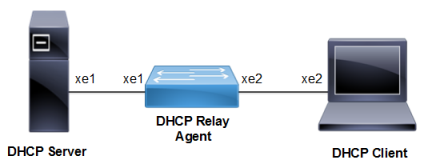
Figure 24. DHCP Relay Configuration
.
DHCP Agent
|
#configure terminal |
Enter configure mode. |
|
(config)#feature dhcp |
Enable the feature dhcp. This is enabled by default. |
|
(config)#ip dhcp relay |
By default this will be enabled. It starts the ip dhcp relay service. |
|
(config)#ip dhcp relay address 10.10.10.2 |
The relay address configured should be server interface address connected to DUT machine. |
|
(config)#interface xe1 |
Enter interface mode. |
|
(config-if)#ip address 10.10.10.1/24 |
Configure ipv4 address on the interface xe1. |
|
(config-if)#ip dhcp relay uplink |
Configure relay uplink on the device connecting the server. |
|
(config-if)#exit |
Exit interface mode. |
|
(config)#commit |
Commit the candidate configuration to the running configuration |
|
(config)#interface xe2 |
Enter interface mode. |
|
(config-if)#ip address 20.20.20.1/24 |
Configure ipv4 address on the interface xe2. |
|
(config-if)#ip dhcp relay |
Relay should be configured on the interface connecting to the client. |
|
(config-if)#exit |
Exit interface mode. |
|
(config)#commit |
Commit the candidate configuration to the running configuration |
Validation Commands
#show running-config dhcp

ip dhcp relay address 10.10.10.2
interface xe2
 ip dhcp relay
!
interface xe1
 ip dhcp relay uplink
!

#show ip dhcp relay
DHCP relay service is Enabled.
VRF Name: default
  Option 82: Disabled
  DHCP Servers configured: 10.10.10.2
  Interface                Uplink/Downlink
  ---------                -------------
  xe2                      Downlink
  xe1                      Uplink

#show ip dhcp relay address
 VRF Name: default
  DHCP Servers configured: 10.10.10.2