DHCPv6 Relay Prefix Delegation Route Injection Configuration
Overview
The prefix delegation feature lets a DHCP server assign prefixes chosen from a global pool to DHCP clients. The DHCP client can then configure an IPv6 address on its LAN interface using the prefix it received. It will then send router advertisements including the prefix, allowing other devices to auto-configure their own IPv6 addresses.
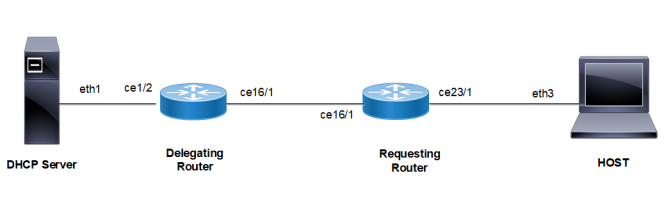
If the network topology where Prefix Delegation is running has a Relay agent, then a route needs to be injected in Delegating Router, so that the traffic from the DHCP server-side shall be forwarded towards the Requesting Router.
| • | Auto-injected routes cannot be leaked between VRFs. |
| • | To ensure smooth auto injection of routes, the operator must ensure that unicast DHCP Renew packets are routed through the Delegating Router. |
Topology
Figure 29. DHCPv6 Relay Delegating Configuration
.
DHCP Relay - Delegating Router (DR)
|
#configure terminal |
Enter configure mode. |
|
(config)#feature dhcp |
Enable the feature DHCP. This is enabled by default. |
|
(config)#ipv6 dhcp relay |
By default, this will be enabled. It starts the IPv6 DHCP relay service. |
|
(config)#ipv6 dhcp relay address 2001:101:0:1::131 |
The relay address configured should be server interface address connected to Delegating Router. |
|
(config)#interface ce1/2 |
Enter interface mode. |
|
(config-if)#ipv6 address 2001:101:0:1::130/64 |
Configure IPv6 address on the interface ce1/2 |
|
(config-if)#ipv6 dhcp relay uplink |
Configure relay uplink on the device connecting the server. |
|
(config-if)#exit |
Exit interface mode. |
|
(config)#commit |
Commit the candidate configuration to the running configuration |
|
(config)#interface ce16/1 |
Enter interface mode. |
|
(config-if)#ipv6 address 3001:101:0:1::135/64 |
Configure IPv6 address on the interface ce16/1 |
|
(config-if)#ipv6 dhcp relay |
Relay should be configured on the interface connecting to the client. |
|
(config-if)#exit |
Exit interface mode. |
|
(config)#commit |
Commit the candidate configuration to the running configuration |
|
(config)#ipv6 dhcp relay pd-route-injection |
Configure to enable auto route injection. |
Requesting Router (RR)
|
#configure terminal |
Enter configure mode. |
|
(config)#interface ce16/1 |
Enter interface mode. |
|
(config-if)#ipv6 address dhcp |
Configure IPv6 address DHCP. |
|
(config-if)#ipv6 dhcp prefix-delegation PREFIX_FROM_SERVER |
Configure IPv6 DHCP prefix-delegation |
|
(config-if)#exit |
Exit interface mode. |
|
(config)#commit |
Commit the candidate configuration to the running configuration |
|
(config)#interface ce23/1 |
Enter interface mode. |
|
(config-if)#ipv6 address PREFIX_FROM_SERVER ::1:0:0:0:1/64 |
Configure IPv6 address from the prefix learnt |
|
(config-if)#ipv6 nd ra-interval 4 |
Configure ra-interval |
|
(config-if)#exit |
Exit interface mode. |
|
(config)#ipv6 route 2001:101:0:1::/64 3001:101:0:1::135 |
Configure static route towards server |
|
(config)#commit |
Commit the candidate configuration to the running configuration |
HOST
|
#configure terminal |
Enter configure mode. |
|
(config)#interface ce23/1 |
Enter interface mode. |
|
(config-if)#ipv6 address autoconfig |
Configure IPv6 autoconfig |
|
(config if)#exit |
Exit interface mode. |
|
(config)#ipv6 route 2001:101:0:1::/64 fe80::ce37:abff:fec9:7426 ce23/1 |
Configure static route towards server |
|
(config)#commit |
Commit the candidate configuration to the running configuration |
Linux Host
|
IPV6_AUTOCONF=yes |
IPv6 autoconfig should be set to yes in interface config file. |
DHCP Server
|
ifconfig eth1 inet6 add 2001:101:0:1::131/64 |
Configure IPv6 address on client facing interface |
|
dhcpd -d -6 -cf /etc/dhcp/dhcpd6.conf eth1 |
Start server |
|
ipv6 route 1212:501:102:1::/64 2001:101:0:1::130 |
Configure static route towards Requesting Router |
Sample dhcpd6.conf file
#
#DHCPv6 Server Configuration file.
#see /usr/share/doc/dhcp*/dhcpd6.conf.sample
#see dhcpd.conf(5) man page
#
preferred-lifetime 400;
default-lease-time 600;

subnet6 2001:101:0:1::/64 {
range6 2001:101:0:1::129 2001:101:0:1::254;
}
subnet6 3001:101:0:1::/64 {
range6 3001:101:0:1::129 3001:101:0:1::254;
prefix6 1212:501:101:: 1212:501:102:: /48;
option dhcp6.name-servers fec0:0:0:1::1;
option dhcp6.domain-search "domain.example";
}
Validation
Delegation Router (DR)
DR#sh ipv6 dhcp relay
IPv6 DHCP relay service is Enabled.
VRF Name: default
  DHCPv6 Servers configured: 2001:101:0:1::131
  DHCPv6 IA_PD Route injection: Enabled
  Interface                Uplink/Downlink
  ---------                -------------
  ce1/2                      Downlink
  ce16/1                     Uplink

DR#sh ipv6 route
IPv6 Routing Table
Codes: K - kernel route, C - connected, S - static, D- DHCP, R - RIP,
       O - OSPF, IA - OSPF inter area, E1 - OSPF external type 1,
       E2 - OSPF external type 2, E - EVPN  N1 - OSPF NSSA external type 1,
       N2 - OSPF NSSA external type 2, i - IS-IS, B - BGP
Timers: Uptime

IP Route Table for VRF "default"
C      ::1/128 via ::, lo, 19:24:04
D      1212:501:102::/48 [80/0] via fe80::eac5:7aff:fe64:4a20, ce16/1, 00:00:01
C      2001:101:0:1::/64 via ::, xe4, 03:42:58
C      3001:101:0:1::/64 via ::, xe2, 02:51:04
C      4001:101:0:1::/64 via ::, xe5, 03:14:41
C      fe80::/64 via ::, xe9, 00:41:39

#sh ipv6 dhcp pd-route
VRF : default
  1212:501:102::/48 via fe80::eac5:7aff:fe64:4a20, ce16/1, (2019-05-30 14:02:50 - 2
019-05-30 14:04:50)
Requesting Router (RR)
RR#show ipv6 dhcp interface

ce16/1 is in client mode
prefix name: PREFIX_FROM_SERVER1
learned prefix: 1212:501:102::/48
preferred lifetime 600, valid lifetime 600
interfaces using the learned prefix
ce23/1    1212:501:102:1::1

RR#sh ipv6 interface ce23/1 brief
Interface            IPv6-Address                                      Admin-Status
Ce23/1               *1212:501:102:1::1
                     fe80::ce37:abff:fec9:7426                         [up/up]

RR#show int ce23/1
Interface ce23/1
Scope: both
Flexport: Breakout Control Port (Active): Break Out Enabled
Hardware is ETH  Current HW addr: cc37.abc9.7426
Physical:cc37.abc9.743f  Logical:(not set)
Port Mode is Router
Interface index: 10025
Metric 1 mtu 1500 duplex-full link-speed 1g
Debounce timer: disable
<UP,BROADCAST,RUNNING,MULTICAST>
VRF Binding: Not bound
DHCP client is disabled.
Last Flapped: 2021 Mar 02 09:44:05 (00:03:55 ago)
Statistics last cleared: 2021 Mar 02 09:44:05 (00:03:55 ago)
inet6 1212:501:102:1::1/64
inet6 fe80::ce37:abff:fec9:7426/64
ND router advertisements are sent approximately every 571 seconds
ND next router advertisement due in 434 seconds.
ND router advertisements live for 1800 seconds
Hosts use stateless autoconfig for addresses.
5 minute input rate 2 bits/sec, 0 packets/sec
5 minute output rate 23 bits/sec, 0 packets/sec
HOST
[root@localhost ~]#ifconfig -a
eth3      Link encap:Ethernet  HWaddr 00:07:E9:A5:23:4C
inet6 addr: 1212:501:102:1:207:e9ff:fea5:234c/64 Scope:Global
inet6 addr: fe80::207:e9ff:fea5:234c/64 Scope:Link
UP BROADCAST RUNNING MULTICAST  MTU:1500  Metric:1
RX packets:196985 errors:0 dropped:0 overruns:0 frame:0
TX packets:5733 errors:0 dropped:0 overruns:0 carrier:0
collisions:0 txqueuelen:1000
RX bytes:23542362 (22.4 MiB)  TX bytes:710558 (693.9 KiB)

N4#show ipv6 interface xe7 brief
Interface            IPv6-Address                                      Admin-Status
ce23/1               *1212:501:102:1:6821:5fff:fe55:4a27
                     fe80::6a21:5fff:fe55:4a27                         [up/up]