Local Proxy ARP Overview
Local Proxy ARP feature is used to enable local proxy support for ARP requests per interface level. Activation will make the router answer all ARP requests on configured subnet, even for clients that should not normally need routing. Local proxy ARP means that the traffic comes in and goes out the same interface.
The local proxy ARP feature allows responding to ARP requests for IP addresses within a subnet where normally no routing is required. With the local proxy ARP feature enabled, ARP responds to all ARP requests for IP addresses within the subnet and forwards all traffic between hosts in the subnet. Use this feature only on subnets where hosts are intentionally prevented from communicating directly.
Topology
Figure 68. Sample topology
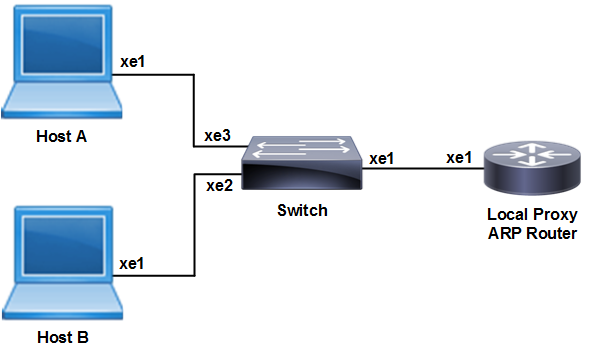
Host A
|
#configure terminal |
Enter Configure mode. |
|
(config)#interface xe1 |
Specify the interface to be configured on Host A |
|
(config-if)#ip address 20.20.0.2/24 |
Configure the ip address on the interface |
|
(config)#commit |
Commit the candidate configuration to the running configuration |
|
(config)#end |
Exit interface and configure mode |
Host B
|
#configure terminal |
Enter Configure mode |
|
(config)#interface xe1 |
Specify the interface to be configured on Host B |
|
(config-if)#ip address 20.20.0.3/24 |
Configure the ip address on the interface |
|
(config)#commit |
Commit the candidate configuration to the running configuration |
|
(config)#end |
Exit interface and configure mode |
Private Vlan Configuration on Switch
|
#configure terminal |
Enter Configure mode. |
|
(config)#bridge 1 protocol ieee vlan-bridge |
Create ieee vlan-bridge on switch for pvlan configuration |
|
(config)#vlan database |
Enter into the vlan database |
|
(config-vlan)#vlan 100-101 bridge 1 state enable |
Create vlans 100 and 101 as part of bridge 1 |
|
(config-vlan)#private-vlan 100 primary bridge 1 |
Configure vlan 100 as a primary vlan |
|
(config-vlan)#private-vlan 101 isolated bridge 1 |
Configure vlan 101 as a isolated vlan |
|
(config-vlan)#private-vlan 100 association add 101 bridge 1 |
Associate secondary vlan 101 to primary vlan 100 |
|
(config-vlan)#exit |
Exit from the vlan database |
|
(config)#commit |
Commit the candidate configuration to the running configuration |
|
(config)#interface xe1 |
Specify the interface to be configured |
|
(config-if)#switchport |
Configure xe1 as a layer2 interface. |
|
(config-if)#bridge-group 1 |
Associate the interface to the bridge |
|
(config-if)#switchport access vlan 100 |
Associate primary vlan to the interface |
|
(config-if)#switchport mode private-vlan promiscuous |
Configure xe1 interface as a promiscuous port |
|
(config-if)#switchport private-vlan mapping 100 add 101 |
Associate primary vlan 100 and secondary vlan 101 to a promiscuous port |
|
(config-if)#exit |
Exit interface mode |
|
(config)#commit |
Commit the candidate configuration to the running configuration |
|
(config)#interface xe2 |
Specify the interface to be configured |
|
(config-if)#switchport |
Configure xe2 as a layer2 interface. |
|
(config-if)#bridge-group 1 |
Associate the interface to the bridge |
|
(config-if)#switchport access vlan 100 |
Associate primary vlan to the interface |
|
(config-if)#switchport mode private-vlan promiscuous |
Configure xe2 interface as a promiscuous port |
|
(config-if)#switchport private-vlan mapping 100 add 101 |
Associate primary vlan 100 and secondary vlan 101 to a promiscuous port |
|
(config-if)#exit |
Exit interface mode |
|
(config)#commit |
Commit the candidate configuration to the running configuration |
|
(config)#interface xe3 |
Specify the interface to be configured |
|
(config-if)#switchport |
Configure xe3 as a layer2 interface. |
|
(config-if)#bridge-group 1 |
Associate the interface to the bridge |
|
(config-if)#switchport access vlan 100 |
Associate primary VLAN to the interface |
|
(config-if)#switchport mode private-vlan promiscuous |
Configure xe2 interface as a promiscuous port |
|
(config-if)#switchport private-vlan mapping 100 add 101 |
Associate primary vlan 100 and secondary vlan 101 to a promiscuous port |
|
(config-if)#exit |
Exit interface mode |
|
(config)#commit |
Commit the candidate configuration to the running configuration |
Enable Local Proxy ARP on Router
|
#configure terminal |
Enter Configure mode |
|
(config)#interface xe1 |
Specify the interface to be configured on Host B |
|
(config-if)#ip address 20.20.0.3/24 |
Configure the ip address on the interface |
|
(config-if)#ip local-proxy-arp |
Enable Local Proxy ARP |
|
(config)#commit |
Commit the candidate configuration to the running configuration |
|
(config)#end |
Exit interface and configure mode |
Validation
ARP cache on Host A and Host B
The show arp command on hosts shows the arp table entries to reach different subnets. Ping Host B from Host A.Host A ARP table should have Router’s xe1 interface MAC address to reach Host B. Execute the below command at Host A.
#show arp

Flags: D - Static Adjacencies attached to down interface

IP ARP Table for context default
Total number of entries: 2
Address          Age          MAC Address     Interface    State
20.20.0.3      00:02:39      ecf4.bbc0.3d71      xe1       STALE.