Synchronization of NTP Server and NTP Clients with NTP ACL configured as noserve
The command noserve ntp acl signifies NTP Clients shall be denied all packets except ntpq(1) and ntpdc(1) queries.
Topology
The procedures in this section use the topology as mentioned below:
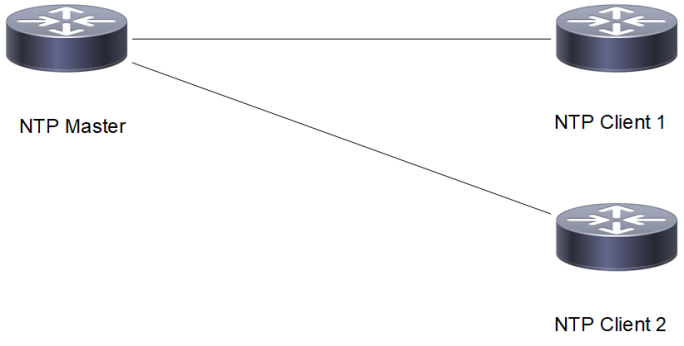
Setup consists of three nodes. One node acting as NTP Master and the other two nodes acting as NTP Clients.
Figure 37. Synchronization of NTP Master and NTP Clients with NTP ACL as noserve
VRF Management Configuration
NTP Master
|
#configure terminal |
Enter configure mode |
|
(config)# feature ntp vrf management |
Enable feature ntp |
|
(config)# ntp enable vrf management |
Enable ntp |
|
(config)# ntp master vrf management |
Configure the node as NTP master |
|
(config)# ntp master stratum 1 vrf management |
Configure the ntp stratum level as 1 indicating that it is using local clock |
|
(config)# ntp authenticate vrf management |
Configure ntp server for authentication |
|
(config)# ntp authentication-key 65 md5 test123 vrf management |
Configure ntp authentication key with password |
|
(config)# ntp trusted-key 65 vrf management |
Configure ntp trusted key |
|
(config)# ntp allow 10.12.20.6 mask 255.255.255.0 noserve vrf management |
Configure the ntp acl noserve in the ntp allow list |
|
(config)#commit |
Commit the configuration |
|
(config)# exit |
Exit configure mode |
NTP Client1
|
#configure terminal |
Enter configure mode. |
|
(config)#feature ntp vrf management |
Enable feature ntp. |
|
(config)#ntp enable vrf management |
Enable ntp |
|
(config)#ntp authenticate vrf management |
Configure ntp client for authentication |
|
(config)#ntp authentication-key 65 md5 test123 vrf management |
Configure ntp authentication key with password |
|
(config)#ntp trusted-key 65 vrf management |
Configure ntp trusted key |
|
(config)#ntp server 10.12.20.5 key 65 vrf management |
Configure ntp server address for the sync to happen with authentication key |
|
(config)#commit |
Commit the configuration |
|
(config)#exit |
Exit Configure mode |
NTP Client2
|
#configure terminal |
Enter configure mode. |
|
(config)#feature ntp vrf management |
Enable feature ntp. |
|
(config)#ntp enable vrf management |
Enable ntp |
|
(config)#ntp authenticate vrf management |
Configure ntp client for authentication |
|
(config)#ntp authentication-key 65 md5 test123 vrf management |
Configure ntp authentication key with password |
|
(config)#ntp trusted-key 65 vrf management |
Configure ntp trusted key |
|
(config)#ntp server 10.12.20.5 key 65 vrf management |
Configure ntp server address for the sync to happen with authentication key |
|
(config)#commit |
Commit the configuration |
|
(config)#exit |
Exit Configure mode |
Validation
Check that with NTP acl configured as noserve, Normal Time synchronization is affected and there is no synchronization.
Check the local clock synchronization in the NTP Master as mentioned below
VTEP1#show ntp peer-status
     remote           refid      st t when poll reach   delay   offset  jitter
==============================================================================
*127.127.1.0     .LOCL.           1 l   41   64  377    0.000    0.000   0.000
Check the ntp client1 synchronization status as mentioned below
#show ntp peer-status
Total peers : 1
* - selected for sync, + -  peer mode(active),
- - peer mode(passive), = - polled in client mode,
x - source false ticker
     remote           refid      st t when poll reach   delay   offset  jitter
==============================================================================
 10.12.20.5      .INIT.          16 u    -   64    0    0.000    0.000   0.000
Check the ntp client2 synchronization status as mentioned below
VTEP2#show ntp peer-status
Total peers : 1
* - selected for sync, + -  peer mode(active),
- - peer mode(passive), = - polled in client mode,
x - source false ticker
     remote           refid      st t when poll reach   delay   offset  jitter
==============================================================================
 10.12.20.5      .INIT.          16 u    -   64    0    0.000    0.000   0.000
User Defined VRF Configuration
NTP Master
|
#configure terminal |
Enter configure mode |
|
(config)# feature ntp vrf vrf1 |
Enable feature ntp |
|
(config)# ntp enable vrf vrf1 |
Enable ntp |
|
(config)# ntp master vrf vrf1 |
Configure the node as NTP master |
|
(config)# ntp master stratum 1 vrf vrf1 |
Configure the ntp stratum level as 1 indicating that it is using local clock |
|
(config)# ntp authenticate vrf vrf1 |
Configure ntp server for authentication |
|
(config)# ntp authentication-key 65 md5 test123 vrf vrf1 |
Configure ntp authentication key with password |
|
(config)# ntp trusted-key 65 vrf vrf1 |
Configure ntp trusted key |
|
(config)# ntp allow 10.12.20.6 mask 255.255.255.0 noserve vrf vrf1 |
Configure the ntp acl noserve in the ntp allow list |
|
(config)#commit |
Commit the configuration |
|
(config)# exit |
Exit configure mode |
NTP Client1
|
#configure terminal |
Enter configure mode. |
|
(config)#feature ntp vrf vrf1 |
Enable feature ntp. |
|
(config)#ntp enable vrf vrf1 |
Enable ntp |
|
(config)#ntp authenticate vrf vrf1 |
Configure ntp client for authentication |
|
(config)ntp authentication-key 65 md5 test123 vrf vrf1 |
Configure ntp authentication key with password |
|
(config)#ntp ntp trusted-key 65 vrf vrf1 |
Configure ntp trusted key |
|
(config)#ntp server 10.12.20.5 key 65 vrf vrf1 |
Configure ntp server address for the sync to happen with authentication key |
|
(config)#commit |
Commit the configuration |
|
(config)#exit |
Exit Configure mode |
NTP Client2
|
#configure terminal |
Enter configure mode. |
|
(config)#feature ntp vrf vrf1 |
Enable feature ntp. |
|
(config)#ntp enable vrf vrf1 |
Enable ntp |
|
(config)#ntp authenticate vrf vrf1 |
Configure ntp client for authentication |
|
(config)#ntp authentication-key 65 md5 test123 vrf vrf1 |
Configure ntp authentication key with password |
|
(config)#ntp trusted-key 65 vrf vrf1 |
Configure ntp trusted key |
|
(config)#ntp server 10.12.20.5 key 65 vrf vrf1 |
Configure ntp server address for the sync to happen with authentication key |
|
(config)#commit |
Commit the configuration |
|
(config)#exit |
Exit Configure mode |
Validation
Check that with NTP acl configured as noserve, Normal Time synchronization is affected and there is no synchronization.
Check the local clock synchronization in the NTP Master as mentioned below
VTEP1#show ntp peer-status
     remote           refid      st t when poll reach   delay   offset  jitter
==============================================================================
*127.127.1.0     .LOCL.           1 l   41   64  377    0.000    0.000   0.000
Check the ntp client1 synchronization status as mentioned below
#show ntp peer-status
Total peers : 1
* - selected for sync, + -  peer mode(active),
- - peer mode(passive), = - polled in client mode,
x - source false ticker
     remote           refid      st t when poll reach   delay   offset  jitter
==============================================================================
 10.12.20.5      .INIT.          16 u    -   64    0    0.000    0.000   0.000
Check the ntp client2 synchronization status as mentioned below
VTEP2#show ntp peer-status
Total peers : 1
* - selected for sync, + -  peer mode(active),
- - peer mode(passive), = - polled in client mode,
x - source false ticker
     remote           refid      st t when poll reach   delay   offset  jitter
==============================================================================
 10.12.20.5      .INIT.          16 u    -   64    0    0.000    0.000   0.000