Configuration
Topology
Figure 77. DHCP Snooping over MLAG
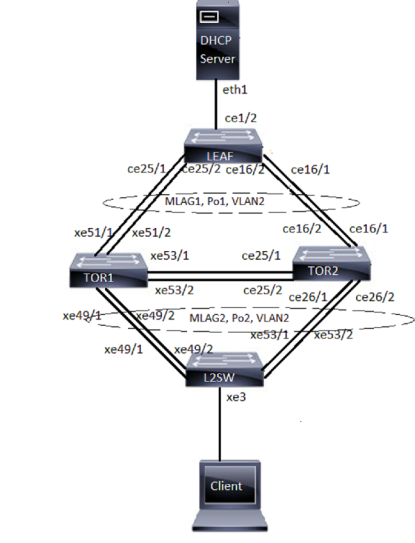
Configuring DHCP snooping over MLAG
LEAF:
|
#configure terminal |
Configure terminal. |
|
(config)#bridge 1 protocol rstp vlan-bridge |
Configuring the rstp vlan bridge |
|
(config)#vlan 2 bridge 1 state enable |
Configure VLAN for the bridge |
|
(config)#interface po1 |
Enter interface mode |
|
(config-if)#switchport |
Make the interface Layer 2 |
|
(config-if)#bridge-group 1 |
Associate the interface to bridge |
|
(config-if)#switchport mode trunk |
Configure the mode as trunk |
|
(config-if)#switchport trunk allowed vlan add 2 |
Allow vlan 2 on the interface |
|
(config-if)#exit |
Exit interface mode |
|
(config)#interface ce1/2 |
Enter interface mode |
|
(config-if)#switchport |
Make the interface Layer 2 |
|
(config-if)#bridge-group 1 |
Associate the interface to bridge |
|
(config-if)#switchport mode trunk |
Configure the mode as trunk |
|
(config-if)#switchport trunk allowed vlan add 2 |
Allow vlan 2 on the interface |
|
(config-if)#exit |
Exit interface mode |
|
(config)#interface ce16/1 |
Enter interface mode |
|
(config-if)#channel-group 1 mode active |
Enable channel-group 1 |
|
(config-if)#exit |
Exit interface mode |
|
(config)#interface ce16/2 |
Enter interface mode |
|
(config-if)#channel-group 1 mode active |
Enable channel-group 1 |
|
(config-if)#exit |
Exit interface mode |
|
(config)#interface ce25/1 |
Enter interface mode |
|
(config-if)#channel-group 1 mode active |
Enable channel-group 1 |
|
(config-if)#exit |
Exit interface mode |
|
(config)#interface ce25/2 |
Enter interface mode |
|
(config-if)#channel-group 1 mode active |
Enable channel-group 1 |
|
(config-if)#exit |
Exit the configure mode |
TOR1:
|
#configure terminal |
Configure terminal. |
|
(config)#bridge 1 protocol rstp vlan-bridge |
Configuring the rstp vlan bridge |
|
(config)#vlan 2 bridge 1 state enable |
Configure VLAN for the bridge |
|
(config)#ip dhcp snooping bridge 1 |
Enable DHCP Snooping on the bridge |
|
(config)#ip dhcp snooping vlan 2 bridge 1 |
Enable DHCP Snooping on the vlan 2 |
|
(config)#interface mlag1 |
Enter Interface mode |
|
(config-if)#switchport |
Make the interface Layer 2 |
|
(config-if)#bridge-group 1 |
Associate the interface to bridge |
|
(config-if)#switchport mode trunk |
Configure the mode as trunk |
|
(config-if)#switchport trunk allowed vlan add 2 |
Allow vlan 2 on the interface |
|
(config-if)#ip dhcp snooping trust |
Enable the port as trusted. |
|
(config-if)#exit |
Exit interface mode |
|
(config)#interface mlag2 |
Enter Interface mode |
|
(config-if)#switchport |
Make the interface Layer 2 |
|
(config-if)#bridge-group 1 |
Associate the interface to bridge |
|
(config-if)#switchport mode trunk |
Configure the mode as trunk |
|
(config-if)# switchport trunk allowed vlan add 2 |
Allow vlan 2 on the interface |
|
(config-if)#exit |
Exit interface mode |
|
(config)#interface po1 |
Enter Interface mode |
|
(config-if)#switchport |
Make the interface Layer 2 |
|
(config-if)#mlag 1 |
Map po1 to mlag1 |
|
(config-if)#exit |
Exit interface mode |
|
(config)#interface po2 |
Enter Interface mode |
|
(config-if)#switchport |
Make the interface Layer 2 |
|
(config-if)#mlag 2 |
Map po2 to mlag2 |
|
(config-if)#exit |
Exit interface mode |
|
(config)#interface po5 |
Enter Interface mode |
|
(config-if)#switchport |
Make the interface Layer 2 |
|
(config-if)#bridge-group 1 |
Associate the interface to bridge |
|
(config-if)#switchport mode trunk |
Configure the mode as trunk |
|
(config-if)#switchport trunk allowed add 2 |
Allow vlan 2 on the interface |
|
(config-if)#exit |
Exit interface mode |
|
(config)#interface xe49/1 |
Enter Interface mode |
|
(config-if)#channel-group 2 mode active |
Enable channel-group 2 |
|
(config-if)#exit |
Exit interface mode |
|
(config)#interface xe49/2 |
Enter Interface mode |
|
(config-if)#channel-group 2 mode active |
Enable channel-group 2 |
|
(config-if)#exit |
Exit interface mode |
|
(config)#interface xe51/1 |
Enter Interface mode |
|
(config-if)#channel-group 1 mode active |
Enable channel-group 1 |
|
(config-if)#exit |
Exit interface mode |
|
(config)#interface xe51/2 |
Enter Interface mode |
|
(config-if)#channel-group 1 mode active |
Enable channel-group 1 |
|
(config-if)#exit |
Exit interface mode |
|
(config)#interface xe53/1 |
Enter Interface mode |
|
(config-if)#channel-group 5 mode active |
Enable channel-group 5 |
|
(config-if)#exit |
Exit interface mode |
|
(config)#interface xe53/2 |
Enter Interface mode |
|
(config-if)#channel-group 5 mode active |
Enable channel-group 5 |
|
(config-if)#exit |
Exit interface mode |
|
(config)#mcec domain configuration |
Enter MCEC mode |
|
(config-mcec-domain)#domain-address 1111.2222.3333 |
Domain address for the mlag domain |
|
(config-mcec-domain)#domain-system-number 2 |
Configure the domain system number |
|
(config-mcec-domain)#intra-domain-link po5 |
Specify the intra domain link for MLAG communication |
|
config-mcec-domain)#end |
Exit the configure mode |
TOR2:
|
#configure terminal |
Configure terminal. |
|
(config)#bridge 1 protocol rstp vlan-bridge |
Configuring the rstp vlan bridge |
|
(config)#vlan 2 bridge 1 state enable |
Configure VLAN for the bridge |
|
(config)#ip dhcp snooping bridge 1 |
Enable DHCP Snooping on the bridge |
|
(config)#ip dhcp snooping vlan 2 bridge 1 |
Enable DHCP Snooping on the vlan 2 |
|
(config)#interface mlag1 |
Enter Interface mode |
|
(config-if)#switchport |
Make the interface Layer 2 |
|
(config-if)#bridge-group 1 |
Associate the interface to bridge |
|
(config-if)#switchport mode trunk |
Configure the mode as trunk |
|
(config-if)#switchport trunk allowed vlan add 2 |
Allow vlan 2 on the interface |
|
(config-if)#ip dhcp snooping trust |
Enable the port as trusted. |
|
(config-if)#exit |
Exit interface mode |
|
(config)#interface mlag2 |
Enter Interface mode |
|
(config-if)#switchport |
Make the interface Layer 2 |
|
(config-if)#bridge-group 1 |
Associate the interface to bridge |
|
(config-if)#switchport mode trunk |
Configure the mode as trunk |
|
(config-if)#switchport trunk allowed vlan add 2 |
Allow vlan 2 on the interface |
|
(config-if)#exit |
Exit interface mode |
|
(config)#interface po1 |
Enter Interface mode |
|
(config-if)#switchport |
Make the interface Layer 2 |
|
(config-if)#mlag 1 |
Map po1 to mlag1 |
|
(config-if)#exit |
Exit interface mode |
|
(config)#interface po2 |
Enter Interface mode |
|
(config-if)#switchport |
Make the interface Layer 2 |
|
(config-if)#mlag 2 |
Map po2 to mlag2 |
|
(config-if)#exit |
Exit interface mode |
|
(config)#interface po5 |
Enter Interface mode |
|
(config-if)#switchport |
Make the interface Layer 2 |
|
(config-if)#bridge-group 1 |
Associate the interface to bridge |
|
(config-if)#switchport mode trunk |
Configure the mode as trunk |
|
(config-if)#switchport trunk allowed vlan add 2 |
Allow vlan 2 on the interface |
|
(config-if)#exit |
Exit interface mode |
|
(config)#interface ce16/1 |
Enter Interface mode |
|
(config-if)#channel-group 1 mode active |
Enable channel-group 1 |
|
(config-if)#exit |
Exit interface mode |
|
(config)#interface ce16/2 |
Enter Interface mode |
|
(config-if)#channel-group 1 mode active |
Enable channel-group 1 |
|
(config-if)#exit |
Exit interface mode |
|
(config)#interface ce25/1 |
Enter Interface mode |
|
(config-if)#channel-group 5 mode active |
Enable channel-group 5 |
|
(config-if)#exit |
Exit interface mode |
|
(config)#interface ce25/2 |
Enter Interface mode |
|
(config-if)#channel-group 5 mode active |
Enable channel-group 5 |
|
(config-if)#exit |
Exit interface mode |
|
(config)#interface ce26/1 |
Enter Interface mode |
|
(config-if)#channel-group 2 mode active |
Enable channel-group 2 |
|
(config-if)#exit |
Exit interface mode |
|
(config)#interface ce26/2 |
Enter Interface mode |
|
(config-if)#channel-group 2 mode active |
Enable channel-group 2 |
|
(config-if)#exit |
Exit interface mode |
|
(config)#mcec domain configuration |
Enter MCEC mode |
|
(config-mcec-domain)#domain-address 1111.2222.3333 |
Domain address for the mlag domain |
|
(config-mcec-domain)#domain-system-number 1 |
Configure the domain system number |
|
(config-mcec-domain)#intra-domain-link po5 |
Specify the intra domain link for MLAG communication |
|
(config-mcec-domain)#end |
Exit the configure mode |
L2SW:
|
#configure terminal |
Configure terminal. |
|
(config)#bridge 1 protocol rstp vlan-bridge |
Configuring the rstp vlan bridge |
|
(config)#vlan 2 bridge 1 state enable |
Configure VLAN for the bridge |
|
(config-if)#interface po2 |
Enter Interface mode |
|
(config-if)#switchport |
Make the interface Layer 2 |
|
(config-if)#bridge-group 1 |
Associate the interface to bridge |
|
(config-if)#switchport mode trunk |
Configure the mode as trunk |
|
(config-if)#switchport trunk allowed vlan add 2 |
Allow vlan 2 on the interface |
|
(config-if)#exit |
Exit interface mode |
|
(config)#interface xe3 |
Enter Interface mode |
|
(config-if)#switchport |
Make the interface Layer 2 |
|
(config-if)#bridge-group 1 |
Associate the interface to bridge |
|
(config-if)#switchport mode trunk |
Configure the mode as trunk |
|
(config-if)#switchport trunk allowed vlan add 2 |
Allow vlan 2 on the interface |
|
(config-if)#exit |
Exit interface mode |
|
(config)#interface xe49/1 |
Enter Interface mode |
|
(config-if)#channel-group 2 mode active |
Enable channel-group 2 |
|
(config-if)#exit |
Exit interface mode |
|
(config)#interface xe49/2 |
Enter Interface mode |
|
(config-if)#channel-group 2 mode active |
Enable channel-group 2 |
|
(config-if)#exit |
Exit interface mode |
|
(config)#interface xe53/1 |
Enter Interface mode |
|
(config-if)#channel-group 2 mode active |
Enable channel-group 2 |
|
(config-if)#exit |
Exit interface mode |
|
(config)#interface xe53/2 |
Enter Interface mode |
|
(config-if)#channel-group 2 mode active |
Enable channel-group 2 |
|
(config-if)#exit |
Exit the configure mode |
Static MLAG configuration for TOR1 and TOR2
Only mlag related configs for static MLAG is provided. While rest of the configuration is similar to dynamic.
TOR1:
|
#configure terminal |
Configure terminal. |
|
(config)#interface mlag1 |
Enter Interface mode |
|
(config-if)#switchport |
Make the interface Layer 2 |
|
(config-if)#bridge-group 1 |
Associate the interface to bridge |
|
(config-if)#switchport mode trunk |
Configure the mode as trunk |
|
(config-if)#switchport trunk allowed vlan add 2 |
Allow vlan 2 on the interface |
|
(config-if)#mode active-standby |
Configure mlag mode for mlag1 |
|
(config-if)#ip dhcp snooping trust |
Enable the port as trusted. |
|
(config-if)#exit |
Exit interface mode |
|
(config)#interface mlag2 |
Enter Interface mode |
|
(config-if)#switchport |
Make the interface Layer 2 |
|
(config-if)#bridge-group 1 |
Associate the interface to bridge |
|
(config-if)#switchport mode trunk |
Configure the mode as trunk |
|
(config-if)#switchport trunk allowed vlan add 2 |
Allow vlan 2 on the interface |
|
(config-if)#mode active-active |
Configure mlag mode for mlag2 |
|
(config-if)#exit |
Exit interface mode |
|
(config)#interface sa1 |
Enter Interface mode |
|
(config-if)#switchport |
Make the interface Layer 2 |
|
(config-if)#mlag 1 |
Map sa1 to mlag1 |
|
(config-if)#exit |
Exit interface mode |
|
(config)#interface sa2 |
Enter Interface mode |
|
(config-if)#switchport |
Make the interface Layer 2 |
|
(config-if)#mlag 2 |
Map sa2 to mlag2 |
|
(config-if)#exit |
Exit interface mode |
|
(config)#interface sa5 |
Enter Interface mode |
|
(config-if)#switchport |
Make the interface Layer 2 |
|
(config-if)#bridge-group 1 |
Associate the interface to bridge |
|
(config-if)#switchport mode trunk |
Configure the mode as trunk |
|
(config-if)#switchport trunk allowed vlan add 2 |
Allow vlan 2 on the interface |
|
(config-if)#exit |
Exit interface mode |
|
(config)#mcec domain configuration |
Enter MCEC mode |
|
(config-mcec-domain)#domain-address 1111.2222.3333 |
Domain address for the mlag domain |
|
(config-mcec-domain)#domain-system-number 1 |
Configure the domain system number |
|
(config-mcec-domain)#intra-domain-link sa5 |
Specify the intra domain link for MLAG communication |
|
(config-mcec-domain)#end |
Exit the configure mode |
TOR2:
|
#configure terminal |
Configure terminal. |
|
(config)#interface mlag1 |
Enter Interface mode |
|
(config-if)#switchport |
Make the interface Layer 2 |
|
(config-if)#bridge-group 1 |
Associate the interface to bridge |
|
(config-if)#switchport mode trunk |
Configure the mode as trunk |
|
(config-if)#switchport trunk allowed vlan add 2 |
Allow vlan 2 on the interface |
|
(config-if)#mode active-standby |
Configure mlag mode for mlag1 |
|
(config-if)#ip dhcp snooping trust |
Enable the port as trusted. |
|
(config-if)#exit |
Exit interface mode |
|
(config)#interface mlag2 |
Enter Interface mode |
|
(config-if)#switchport |
Make the interface Layer 2 |
|
(config-if)#bridge-group 1 |
Associate the interface to bridge |
|
(config-if)#switchport mode trunk |
Configure the mode as trunk |
|
(config-if)#switchport trunk allowed vlan add 2 |
Allow vlan 2 on the interface |
|
(config-if)#mode active-active |
Configure mlag mode for mlag2 |
|
(config-if)#exit |
Exit interface mode |
|
(config)#interface sa1 |
Enter Interface mode |
|
(config-if)#switchport |
Make the interface Layer 2 |
|
(config-if)#mlag 1 |
Map sa1 to mlag1 |
|
(config-if)#exit |
Exit interface mode |
|
(config)#interface sa2 |
Enter Interface mode |
|
(config-if)#switchport |
Make the interface Layer 2 |
|
(config-if)#mlag 2 |
Map sa2 to mlag2 |
|
(config-if)#exit |
Exit interface mode |
|
(config)#interface sa5 |
Enter Interface mode |
|
(config-if)#switchport |
Make the interface Layer 2 |
|
(config-if)#bridge-group 1 |
Associate the interface to bridge |
|
(config-if)#switchport mode trunk |
Configure the mode as trunk |
|
(config-if)#switchport trunk allowed vlan add 2 |
Allow vlan 2 on the interface |
|
(config-if)#exit |
Exit interface mode |
|
(config)#mcec domain configuration |
Enter MCEC mode |
|
(config-mcec-domain)#domain-address 1111.2222.3333 |
Domain address for the mlag domain |
|
(config-mcec-domain)#domain-system-number 2 |
Configure the domain system number |
|
(config-mcec-domain)#intra-domain-link sa5 |
Specify the intra domain link for MLAG communication |
|
(config-mcec-domain)#end |
Exit the configure mode |
Validation
1. Verify Dhcps Sync PDUs:
TOR1#show mcec statistics
Unknown MCCPDU received on the system            : 0
------------------------------------
IDP po5
------------------------------------
   Valid RX Hello PDUs                          : 2373
   Valid TX Hello PDUs                          : 2373
   Valid RX Info PDUs                           : 12
   Valid TX Info PDUs                           : 20
   Valid RX Mac Sync PDUs                       : 20
   Valid TX Mac Sync PDUs                       : 20
   Valid RX Dhcps Sync PDUs                     : 1
   Valid TX Dhcps Sync PDUs                     : 3
MLAG 1
  Valid RX Info PDUs                            : 6
  Valid TX Info PDUs                            : 10
MLAG 2
  Valid RX Info PDUs                            : 6
  Valid TX Info PDUs                            : 10
TOR1#
TOR2#show mcec statistics
Unknown MCCPDU received on the system            : 0
------------------------------------
IDP po5
------------------------------------
   Valid RX Hello PDUs                          : 2384
   Valid TX Hello PDUs                          : 2385
   Valid RX Info PDUs                           : 18
   Valid TX Info PDUs                           : 12
   Valid RX Mac Sync PDUs                       : 20
   Valid TX Mac Sync PDUs                       : 16
   Valid RX Dhcps Sync PDUs                     : 3
   Valid TX Dhcps Sync PDUs                     : 1
MLAG 1
  Valid RX Info PDUs                            : 9
  Valid TX Info PDUs                            : 6
MLAG 2
  Valid RX Info PDUs                            : 9
  Valid TX Info PDUs                            : 6
2. Verify dhcp binding entires:
TOR2#
TOR1# show ip dhcp snooping binding bridge 1
Total number of static IPV4 entries                     : 0
Total number of dynamic IPV4 entries                    : 1
Total number of static IPV6 entries                     : 0
Total number of dynamic IPV6 entries                    : 0
MacAddress           IpAddress         Lease(sec) Type            VLAN   Interfa
ce
------------------   ---------------   ---------- -------------   ----   -------
-----------
80a2.35e9.8323       20.20.20.2        315        dhcp-snooping   2      mlag2
TOR1#
TOR2#show ip dhcp snooping binding bridge 1
Total number of static IPV4 entries                     : 0
Total number of dynamic IPV4 entries                    : 1
Total number of static IPV6 entries                     : 0
Total number of dynamic IPV6 entries                    : 0
MacAddress           IpAddress         Lease(sec) Type            VLAN   Interface
------------------   ---------------   ---------- -------------   ----   ------------------
80a2.35e9.8323       20.20.20.2        315        dhcp-snooping   2      mlag2
3. Verify that DHCP snooping is enabled on the bridge
TOR2#
TOR1#show ip dhcp snooping bridge 1
Bridge Group                                            : 1
DHCP snooping is                                        : Enabled
DHCP snooping option82 is                               : Disabled
Verification of hwaddr field is                         : Disabled
Strict validation of DHCP packet is                     : Disabled
DB Write Interval(secs)                                 : 300
DHCP snooping is configured on following VLANs          : 2
DHCP snooping is operational on following VLANs         : 2
DHCP snooping trust is configured on the following Interfaces
Interface                Trusted
---------------          -------
mlag1                    Yes
po5                      Yes
DHCP snooping IP Source Guard is configured on the following Interfaces
Interface                Source Guard
---------------          ------------
TOR1#
TOR2#show ip dhcp snooping bridge 1
Bridge Group                                            : 1
DHCP snooping is                                        : Enabled
DHCP snooping option82 is                               : Disabled
Verification of hwaddr field is                         : Disabled
Strict validation of DHCP packet is                     : Disabled
DB Write Interval(secs)                                 : 300
DHCP snooping is configured on following VLANs          : 2
DHCP snooping is operational on following VLANs         : 2
DHCP snooping trust is configured on the following Interfaces
Interface                Trusted
---------------          -------
mlag1                    Yes
po5                      Yes
DHCP snooping IP Source Guard is configured on the following Interfaces
Interface                Source Guard
---------------          ------------
TOR2#
4. Verify dhcp snooping running configs
TOR1#show running-config ip dhcp snooping
!
debug ip dhcp snooping all
!
ip dhcp snooping bridge 1
ip dhcp snooping vlan 2 bridge 1
interface mlag1
 ip dhcp snooping trust
!
interface po5
 ip dhcp snooping trust
!
TOR1#
TOR2#show running-config ip dhcp snooping
!
debug ip dhcp snooping all
!
ip dhcp snooping bridge 1
ip dhcp snooping vlan 2 bridge 1
interface mlag1
 ip dhcp snooping trust
!
interface po5
 ip dhcp snooping trust
!
TOR2#
5. Verify mlag details:
TOR2#show mlag domain details
------------------------------------
Domain Configuration
------------------------------------
Domain System Number           : 1
Domain Address                 : 1111.2222.3333
Domain Priority                : 32768
Intra Domain Interface         : po5
Hello RCV State                : Current
Hello Periodic Timer State     : Slow Periodic
Domain Sync                    : IN_SYNC
Neigh Domain Sync              : IN_SYNC
Domain Adjacency               : UP
------------------------------------
MLAG Configuration
------------------------------------
MLAG-1
  Mapped Aggregator            : po1
  Admin Key                    : 16385
  Oper Key                     : 16385
  Physical properties Digest   : 54 a9 3a 2a 2b 50 65 bb 3c bc 3d bd c2 43 d6 22
  Neigh Admin Key              : 32769
  Neigh Physical Digest        : 54 a9 3a 2a 2b 50 65 bb 3c bc 3d bd c2 43 d6 22
  Info RCV State               : Current
  Info Periodic Time State     : Standby
  Total Bandwidth              : 40g
  Mlag Sync                    : IN_SYNC
  Mlag Mode                    : Active-Active
  Mlag State                   : UP
MLAG-2
  Mapped Aggregator            : po2
  Admin Key                    : 16386
  Oper Key                     : 16386
  Physical properties Digest   : 54 a9 3a 2a 2b 50 65 bb 3c bc 3d bd c2 43 d6 22
  Neigh Admin Key              : 32770
  Neigh Physical Digest        : 54 a9 3a 2a 2b 50 65 bb 3c bc 3d bd c2 43 d6 22
  Info RCV State               : Current
  Info Periodic Time State     : Standby
  Total Bandwidth              : 40g
  Mlag Sync                    : IN_SYNC
  Mlag Mode                    : Active-Active
  Mlag State                   : UP
TOR2#
TOR1#show mlag domain details
------------------------------------
Domain Configuration
------------------------------------
Domain System Number           : 2
Domain Address                 : 1111.2222.3333
Domain Priority                : 32768
Intra Domain Interface         : po5
Hello RCV State                : Current
Hello Periodic Timer State     : Slow Periodic
Domain Sync                    : IN_SYNC
Neigh Domain Sync              : IN_SYNC
Domain Adjacency               : UP
------------------------------------
MLAG Configuration
------------------------------------
MLAG-1
  Mapped Aggregator            : po1
  Admin Key                    : 32769
  Oper Key                     : 16385
  Physical properties Digest   : 54 a9 3a 2a 2b 50 65 bb 3c bc 3d bd c2 43 d6 22
  Neigh Admin Key              : 16385
  Neigh Physical Digest        : 54 a9 3a 2a 2b 50 65 bb 3c bc 3d bd c2 43 d6 22
  Info RCV State               : Current
  Info Periodic Time State     : Standby
  Total Bandwidth              : 40g
  Mlag Sync                    : IN_SYNC
  Mlag Mode                    : Active-Active
  Mlag State                   : UP
MLAG-2
  Mapped Aggregator            : po2
  Admin Key                    : 32770
  Oper Key                     : 16386
  Physical properties Digest   : 54 a9 3a 2a 2b 50 65 bb 3c bc 3d bd c2 43 d6 22
  Neigh Admin Key              : 16386
  Neigh Physical Digest        : 54 a9 3a 2a 2b 50 65 bb 3c bc 3d bd c2 43 d6 22
  Info RCV State               : Current
  Info Periodic Time State     : Standby
  Total Bandwidth              : 40g
  Mlag Sync                    : IN_SYNC
  Mlag Mode                    : Active-Active
  Mlag State                   : UP
TOR1#